Azure Load Balancing Explained – Choosing the Right Solution

When exploring load balancing options in Azure, you’ll come across four different services:
- Load Balancer
- Application Gateway
- Front Door
- Traffic Manager
Each serves a different purpose, and choosing the right one can be confusing. In this article, we’ll break down their functionality and help you determine which best fits your workloads.
Understanding Load Balancers: A General Overview
A load balancer is a networking component that distributes incoming traffic across multiple backend servers or resources to ensure high availability, reliability, and optimal performance.
Without a load balancer, a single server would handle all incoming requests, leading to:
- Overloading – If too many requests arrive, the server may slow down or crash.
- Single Point of Failure (SPOF) – If the server fails, the entire application goes offline.
- Inefficient Resource Utilization – Some servers might be underutilized while others are overloaded.
A load balancer prevents these issues by intelligently routing traffic based on factors like server health, workload, response time, and geographical location.
Load balancers operate at different layers of the network stack, primarily:
- Layer 4 (Transport Layer) – Routes traffic based on IP address and port (e.g., TCP/UDP load balancing)
- Layer 7 (Application Layer) – Routes traffic based on HTTP headers, URL paths, or cookies (e.g., HTTP/HTTPS load balancing)
In cloud environments, many resources are not or should not be directly exposed to the internet. Instead, a load balancer is needed to manage and route incoming traffic efficiently while improving security, scalability, and resilience.
In the next sections, we will explore the different load balancing services Azure offers and how they fit into various use cases.
Azure Load Balancer
Azure Load Balancer is the core Layer 4 (Transport Layer) load balancing solution in Azure. It distributes TCP and UDP traffic across backend resources, ensuring high availability and reliability.
Public vs. Private Load Balancer
- A Public Load Balancer has a public IP address as its frontend, making it accessible from the internet.
- A Private Load Balancer uses a private IP address from an Azure VNet/subnet, limiting access to internal resources.
TCP vs. UDP Load Balancing
- Supports both TCP and UDP traffic.
- Listens for incoming connections and distributes them across backend resources.
Health Checks
- Monitors backend resources using custom health probes.
- Automatically detects and marks unhealthy instances, ensuring traffic is only sent to responsive backend servers.
Example Use Case
A public TCP load balancer that forwards incoming internet traffic to three backend servers for improved availability.
Benefits
- Eliminates single points of failure by distributing traffic across multiple backend servers.
- Optimizes response times by balancing the load efficiently.
- Enhances security by keeping backend servers hidden from direct internet exposure.

Application Gateway
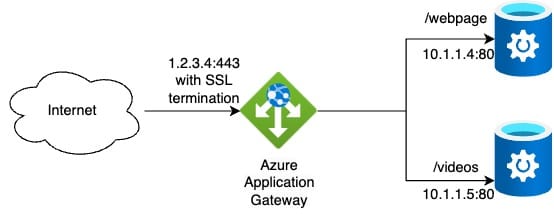
Azure Application Gateway is a Layer 7 (Application Layer) load balancer designed for web applications. It provides intelligent traffic management, security features, and application-aware routing.
Key Features
- Layer 7 Routing – Routes traffic based on HTTP headers, URL paths, or hostnames, allowing advanced request handling.
- SSL Termination – Offloads SSL/TLS encryption and decryption, reducing backend server load.
- Web Application Firewall (WAF) – Protects applications from common web threats like SQL injection and cross-site scripting (XSS).
- Autoscaling – Automatically scales based on traffic demand without manual intervention.
- Session Affinity – Ensures users' requests are consistently routed to the same backend server.
Example Use Case
An Application Gateway with WAF protecting a web application, routing requests based on URL paths (e.g., /website traffic goes to backend web servers, while /videos traffic goes video storage).
Benefits
- Advanced traffic control with URL-based routing and session affinity.
- Built-in security with Web Application Firewall (WAF).
- Reduces backend workload by handling SSL termination.
Azure Front Door
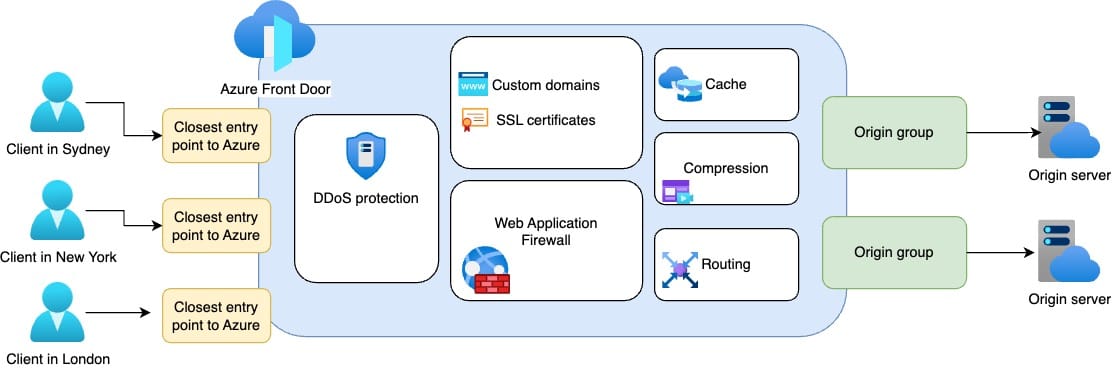
Azure Front Door is a global, Layer 7 (Application Layer) load balancer designed to optimize performance and security for web applications. It provides intelligent routing, acceleration, and security for internet-facing applications across multiple regions.
Key Features
- Global Load Balancing – Routes traffic to the closest or healthiest backend across different Azure regions.
- Anycast Routing – Uses a single global IP to direct users to the nearest Azure edge location, reducing latency.
- SSL Offloading – Terminates SSL/TLS at the edge, improving performance for backend services.
- Web Application Firewall (WAF) – Protects applications against web-based attacks like DDoS, SQL injection, and XSS.
- Caching and Acceleration – Uses Azure’s global edge network to improve response times by caching static content.
Example Use Case
An e-commerce website serving users worldwide uses Azure Front Door to route users to the closest backend region while securing traffic with WAF and DDoS protection.
Benefits
- Low-latency global traffic distribution using Azure’s edge network.
- Enhanced security with built-in DDoS protection and WAF.
- Optimized performance through intelligent caching and acceleration.
Azure Traffic Manager
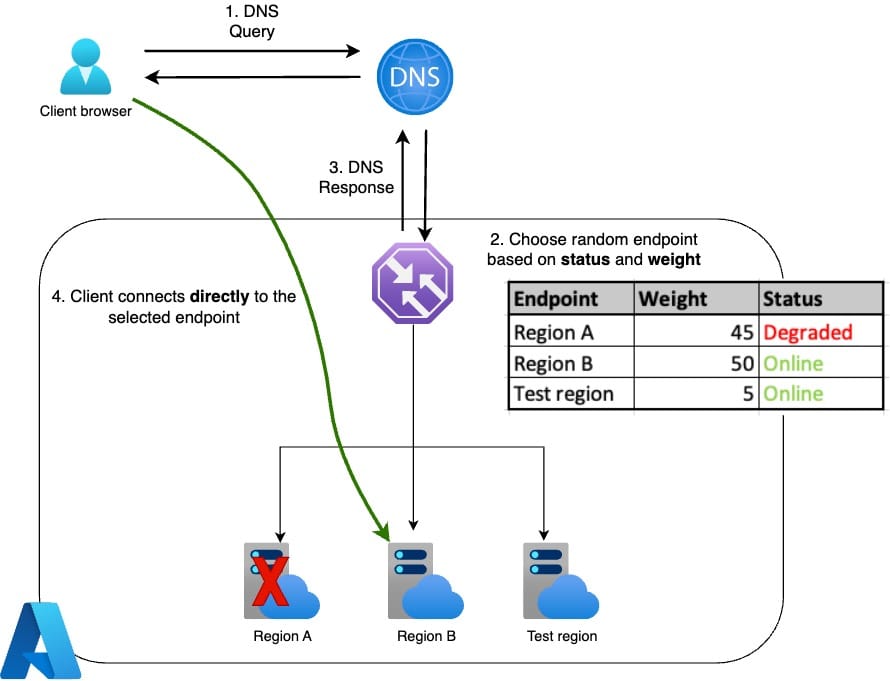
Azure Traffic Manager is a DNS-based traffic routing solution that directs users to the most appropriate endpoint based on routing policies and health checks. Unlike traditional load balancers, Traffic Manager operates at the DNS level, making it ideal for global applications, disaster recovery, and multi-region deployments.
Key features
DNS-Based Load Balancing – Routes users based on domain name resolution, not real-time traffic flow.
Multiple Routing Methods – Supports various traffic routing policies, including:
- Priority – Directs all traffic to a primary endpoint unless it becomes unavailable.
- Weighted – Distributes traffic across multiple endpoints based on assigned weights.
- Performance – Routes users to the lowest-latency endpoint based on geographic location.
- Geographic – Directs users to a specific endpoint based on their physical location.
- Multivalue & Subnet – Provides multiple IP addresses or routes based on user subnets.
Endpoint Health Monitoring – Continuously checks the availability of backend services and redirects traffic when an endpoint is unhealthy.
Supports Any Public Endpoint – Works with Azure services, external websites, or on-premises servers.
Example use case
A multi-region SaaS platform serving users from different continents can use Azure Traffic Manager to route customers to the nearest or best-performing data center while ensuring automatic failover in case of regional outages.
Benefits
- Global traffic distribution with multiple routing policies.
- Improved application availability via automatic failover.
- Flexible deployment, supporting both Azure and external endpoints.
One-page summary from Azure portal
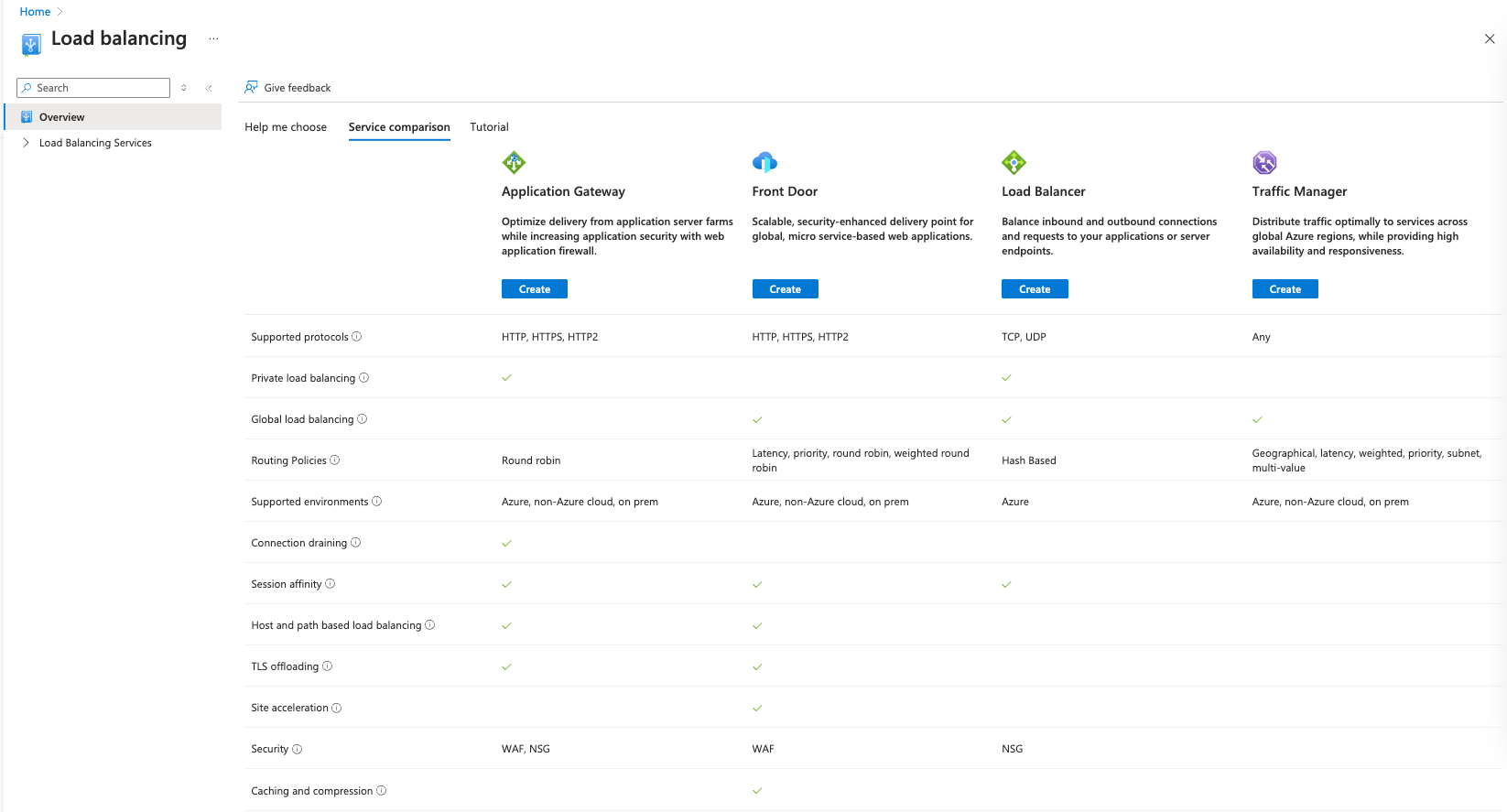
Selecting the right load balancing service in Azure requires careful planning and a solid understanding of your specific needs. Some options have overlapping features, so be sure to choose the one that best fits your use case.
I hope this article has provided valuable insights to help you make an informed decision. If you have any questions, feedback, or run into challenges, feel free to share them in the comments—I’d love to hear from you!