Azure Route Server and NVA: Enforcing VNet Traffic - plus Terraform code

Earlier this week, I had a discussion with a cloud architect, which made me realize that I had some blind spots when it came to Azure Route Server (ARS). So, I went back to my personal lab to explore its functionality in more depth.
Lab topology
To test my understanding, I created a lab with the following setup:
- Hub Virtual Network (VNet) hosting an NVA (Network Virtual Appliance) and Azure Route Server
- Two Spoke VNets, each only peered with the hub
- BGP enabled between the NVA and Azure Route Server
- Spoke-to-spoke traffic forced through the NVA
The goal was to understand how Azure Route Server can dynamically manage routing and how it differs from static routing approaches.
Why Use Azure Route Server?
There are scenarios where simple VNet peering doesn’t meet enterprise networking requirements. By default, VNet peering enables full connectivity between resources in the connected VNets. However, some enterprises require traffic filtering or inspection between VNets.
A common way to achieve this is by forcing inter-VNet traffic through a firewall or network appliance. In Azure, this can be done using:
- Azure Firewall (Microsoft’s native firewall solution)
- Third-party NVAs (Network Virtual Appliances) such as:
- Cisco ASR, ASA
- Palo Alto NGFW
- FortiGate NGFW
- F5 Load Balancer
- Or even a simple Linux VM running iptables, UFW, or other network tools
To redirect traffic through an NVA, we typically create User-Defined Routes (UDRs) in Azure. This involves:
- Manually creating route tables
- Assigning next-hop values to the NVA
- Updating routes when topology changes
This manual approach can quickly become complex and error-prone—especially in environments with dozens of VNets and subnets.
How Azure Route Server (ARS) Solves This Problem
Azure Route Server simplifies routing by dynamically injecting routes into VNets via BGP. Here’s how it helps:
- Eliminates manual UDR management – ARS learns routes from the NVA dynamically.
- Automatically updates routes – No need to manually modify next-hop settings.
- Scales better – Supports multiple NVAs for redundancy.
- High availability – Deploys two redundant BGP peering IPs for failover.
Once an NVA establishes a BGP session with ARS, the learned routes are automatically injected into Azure’s routing tables. This means that every VM and resource in the network will start routing traffic through the NVA without requiring manual UDRs.
Testing Spoke-to-Spoke Routing via the NVA
To validate this, I set up the following lab environment:
- Hub VNet: Hosts an NVA and Azure Route Server
- Spoke VNets: Only peered with the hub, no direct peering between spokes
- BGP Session: Established between NVA and ARS
- Traffic Flow: Spoke-to-spoke traffic should only pass through the NVA

After setting up BGP peering, I verified that:
✅ ARS was receiving routes from the NVA.
✅ The learned routes were being injected into the spoke VNets.
✅ Spoke-to-spoke traffic was successfully routed via the NVA.
This confirms that Azure Route Server can dynamically manage routing, avoiding the need for static UDRs while ensuring that traffic inspection and security policies are enforced.
Command outputs
BGP neigborship formed between NVA and the 2 ASR peer IPs:
nva-test# sh ip bgp summary

IPv4 Unicast Summary (VRF default):
BGP router identifier 10.0.1.4, local AS number 65020 vrf-id 0
BGP table version 6
RIB entries 8, using 1472 bytes of memory
Peers 2, using 1446 KiB of memory

Neighbor        V         AS   MsgRcvd   MsgSent   TblVer  InQ OutQ  Up/Down State/PfxRcd   PfxSnt Desc
10.0.3.4        4      65515       175       160        0    0    0 00:01:37            3        1 N/A
10.0.3.5        4      65515       173       160        0    0    0 00:01:37            3        1 N/A
Routes are being received and advertised:
nva-test# sh ip bgp
BGP table version is 4, local router ID is 10.0.1.4, vrf id 0
Default local pref 100, local AS 65020
Status codes:  s suppressed, d damped, h history, * valid, > best, = multipath,
               i internal, r RIB-failure, S Stale, R Removed
Nexthop codes: @NNN nexthop's vrf id, < announce-nh-self
Origin codes:  i - IGP, e - EGP, ? - incomplete
RPKI validation codes: V valid, I invalid, N Not found

   Network          Next Hop            Metric LocPrf Weight Path
   10.0.0.0/8       0.0.0.0                  0         32768 i
   10.0.0.0/16      10.0.3.5                               0 65515 i
                    10.0.3.4                               0 65515 i
   10.1.0.0/16      10.0.3.5                               0 65515 i
                    10.0.3.4                               0 65515 i
   10.2.0.0/16      10.0.3.5                               0 65515 i
                    10.0.3.4                               0 65515 i
Proof that spoke virtual network has learned the advertised route:
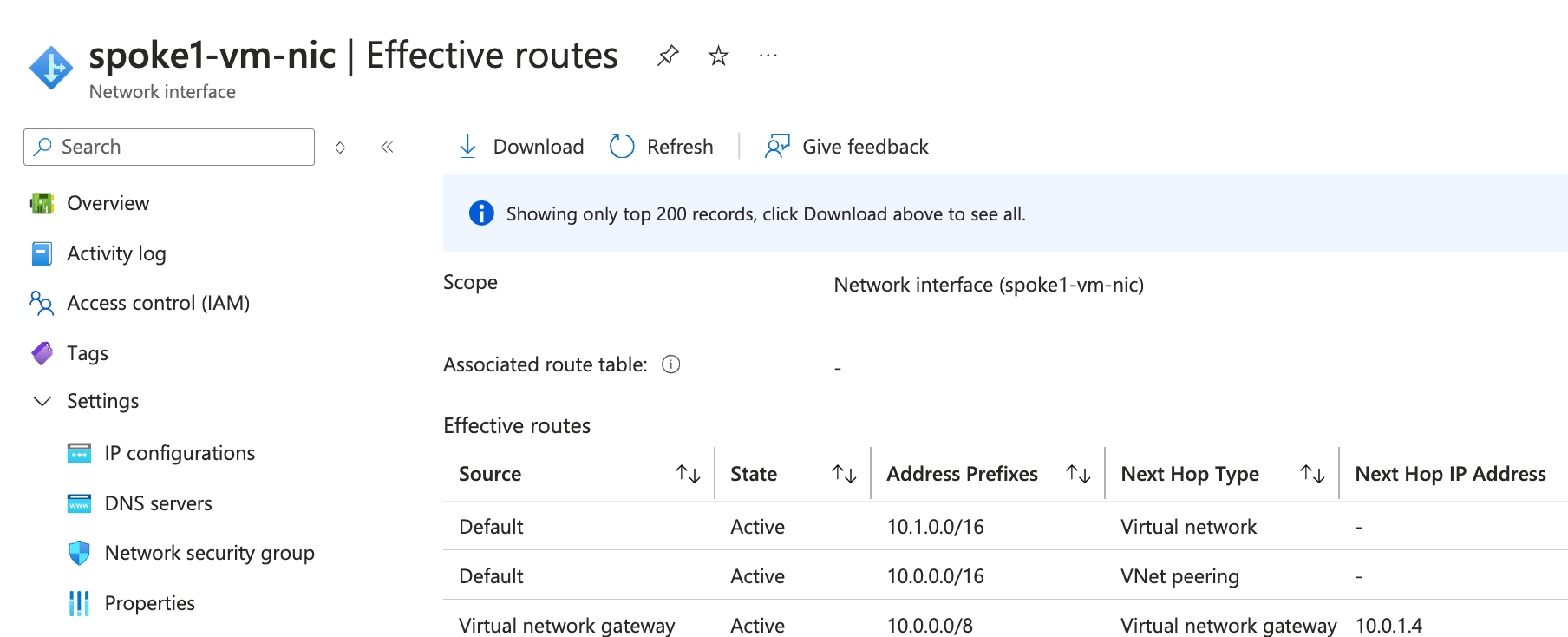
Ping is successful between the spoke-01 and spoke-02 servers, and traceroute shows the NVA as a transit hop:
gergo@spoke1-vm:~$ ping 10.2.1.4
PING 10.2.1.4 (10.2.1.4) 56(84) bytes of data.
64 bytes from 10.2.1.4: icmp_seq=1 ttl=63 time=5.87 ms
64 bytes from 10.2.1.4: icmp_seq=2 ttl=63 time=2.48 ms
^C
--- 10.2.1.4 ping statistics ---
2 packets transmitted, 2 received, 0% packet loss, time 1002ms
rtt min/avg/max/mdev = 2.482/4.174/5.866/1.692 ms

gergo@spoke1-vm:~$ traceroute 10.2.1.4
traceroute to 10.2.1.4 (10.2.1.4), 30 hops max, 60 byte packets
 1  10.0.1.4 (10.0.1.4)  1.528 ms  1.503 ms  1.490 ms # This is the NVA IP
 2  10.2.1.4 (10.2.1.4)  2.736 ms *  2.706 ms         # Spoke-02 server IP
Final Thoughts
Azure Route Server is a powerful tool for simplifying routing and enforcing network policies in cloud environments. By integrating BGP-based dynamic routing, it eliminates the need for manual UDR management, making it an ideal solution for large-scale enterprise architectures.
This was an insightful learning experience for me, and I hope this post helps others who are designing hub-and-spoke topologies in Azure.
💬 Have you used Azure Route Server in production? Share your thoughts or challenges in the comments!