Connecting Your Hybrid Cloud with GCP Connectivity Center and Router Appliance - with Terraform

Want to learn how to integrate GCP NCC and Cloud DNS with Enterprise IPAM? Check out my latest blog post using the button below.
In hybrid cloud environments, connecting on-premises networks to Google Cloud in a scalable and manageable way is a common challenge. Google Cloud’s Connectivity Center offers a powerful, hub-and-spoke model to streamline and centralize these network connections.
In this post, I’ll walk you through how to set up a Router Appliance in GCP using Terraform—a feature that allows you to integrate your own virtual routers (such as SD-WAN appliances) into Google’s network fabric. We’ll deploy two VPCs: one acting as a network hub with a Router Appliance VM, and another for testing connectivity with a regular VM instance.
Whether you’re exploring SD-WAN integrations, setting up a hybrid network lab, or just curious about how GCP handles custom routing with Cloud Routers and BGP, this guide will give you a hands-on starting point.
Let’s dive in.
What is GCP Network Connectivity Center?
Network Connectivity Center (NCC) is Google Cloud’s centralized network connectivity management solution. It provides a hub-and-spoke model to simplify how you connect and manage VPCs, VPNs, interconnects, and SD-WAN gateways across hybrid and multi-cloud environments.
Instead of managing individual peering relationships between every VPC or on-prem location, NCC lets you create a single connectivity hub—a central point that routes traffic between all attached spokes. These spokes can represent VPC networks, Cloud Interconnects, VPNs, or Router Appliances—virtual machines acting as custom routers within your VPCs.
By using NCC:
- You reduce complexity and manual peering/route configuration.
- You get better visibility into your hybrid network topology.
- You can easily scale your network by attaching new locations as spokes.
In our setup, we’ll use a Router Appliance spoke to connect a custom virtual router VM into the NCC hub, allowing dynamic BGP route exchange with a GCP Cloud Router, and eventually with other VPCs.
Step-by-Step: Building a Test Environment for Network Connectivity Center with Router Appliance
To truly understand how GCP’s Network Connectivity Center and Router Appliance work together, we’ll build a minimal but fully functional test environment.
This is the architecture diagram of the solution:
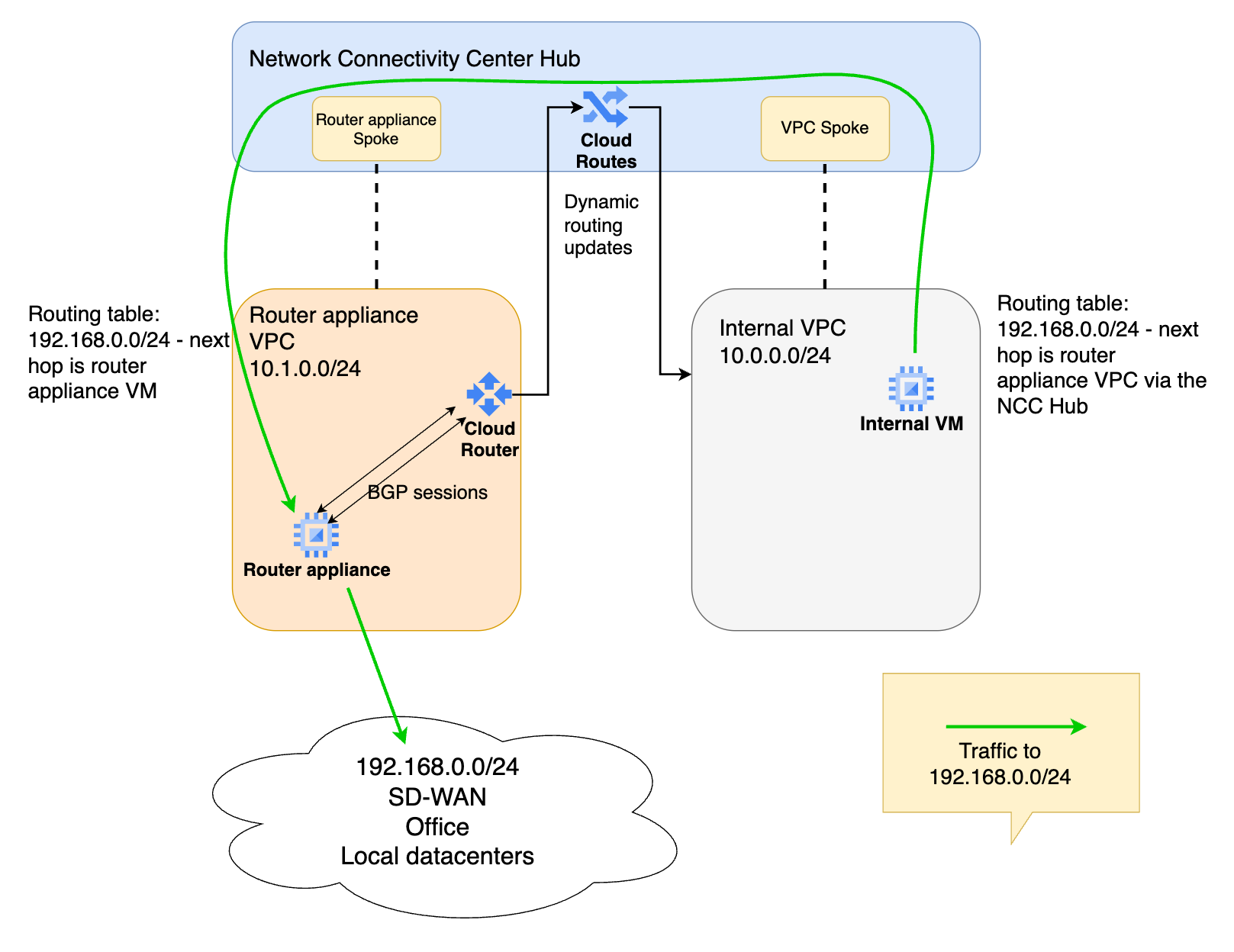
This environment consists of:
- A Connectivity Center hub
- An internal VPC as a spoke, with a test VM in it
- A router appliance VPC, where our virtual machine router is deployed
- A router appliance VM attached as a spoke
- A Cloud Router that handles BGP route exchange between the Router Appliance and the NCC Hub
Preparing the Google Cloud environment
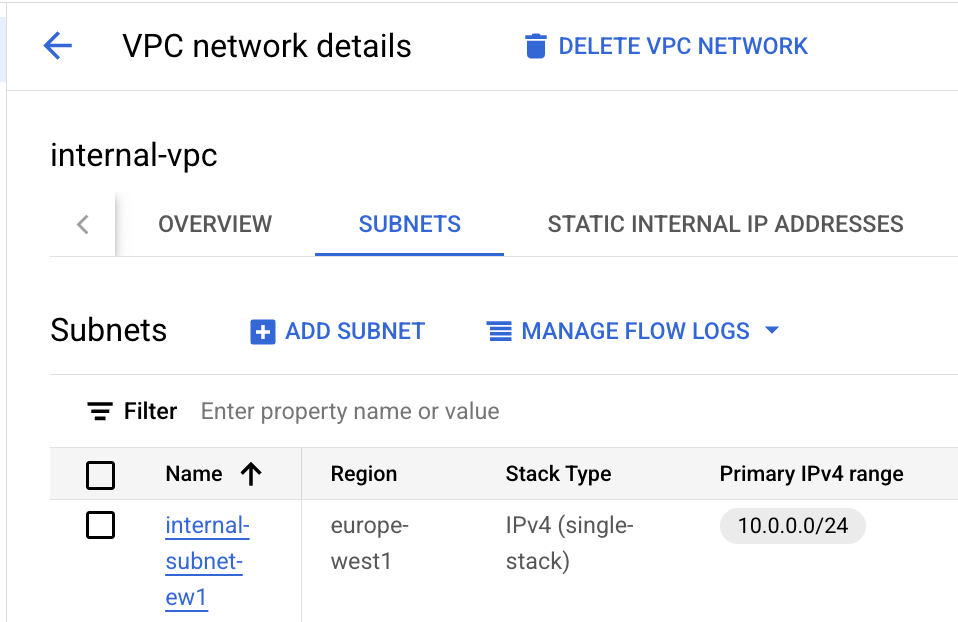
- Create an internal VPC, with a 10.0.0.0/24 subnet.
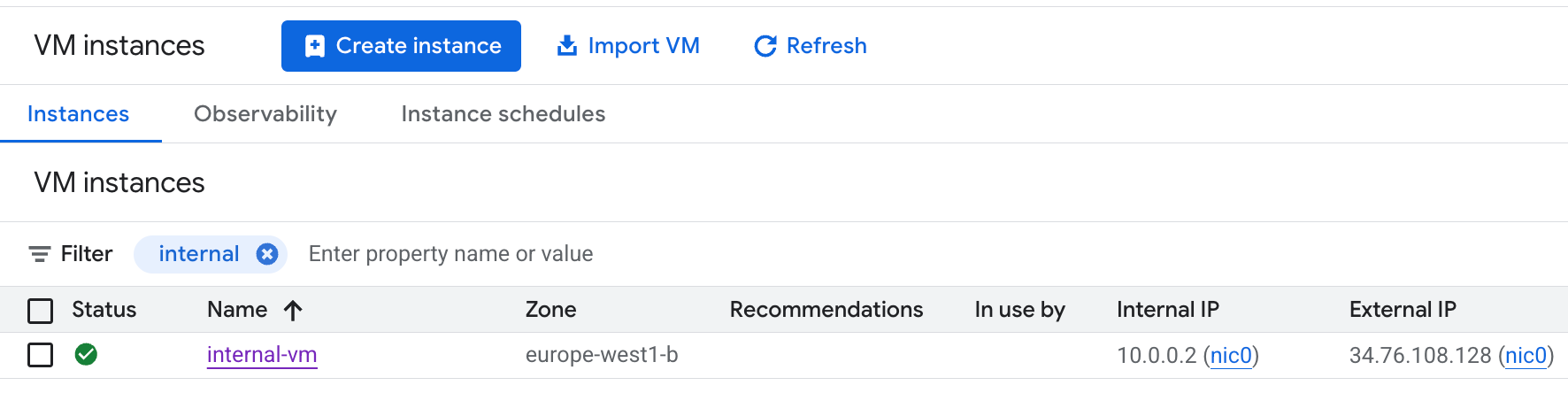
- Deploy a small Linux VM into this internal subnet.
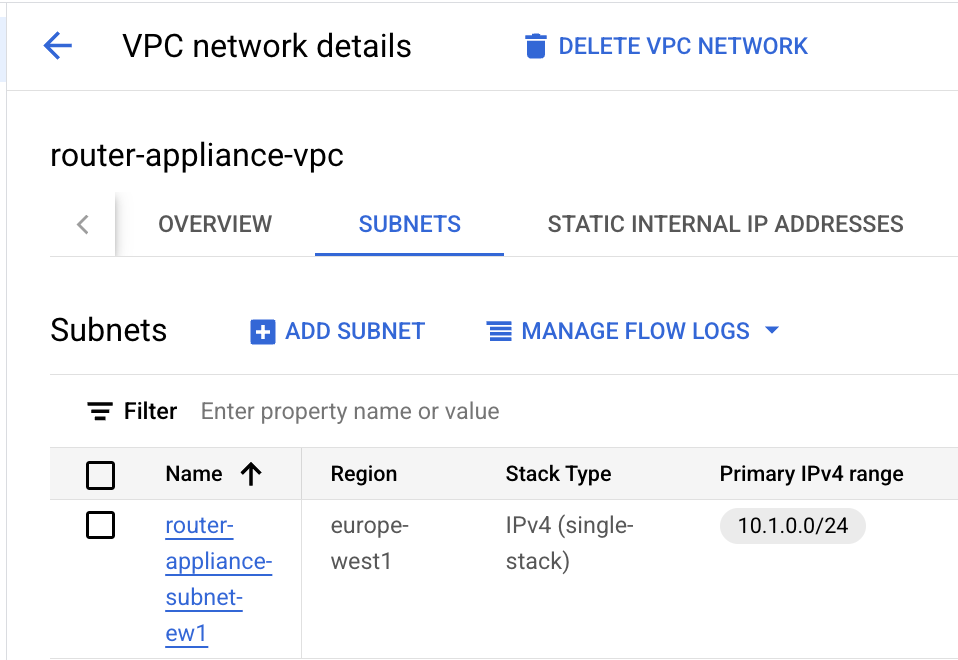
- Create a router appliance VPC, with a 10.1.0.0/24 subnet.
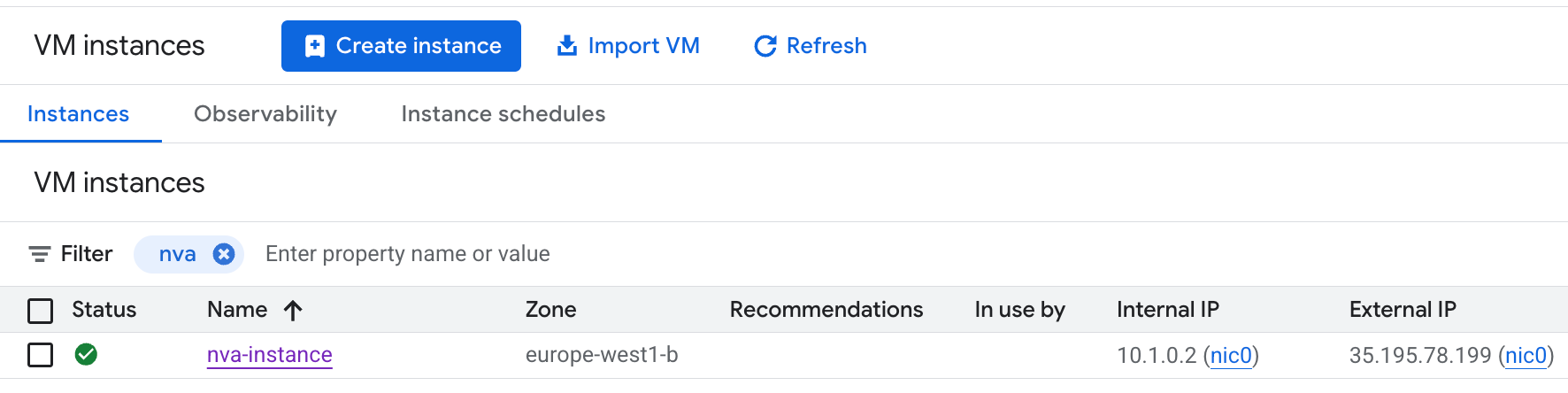
- Deploy a small Linux VM, this will be our router appliance later.
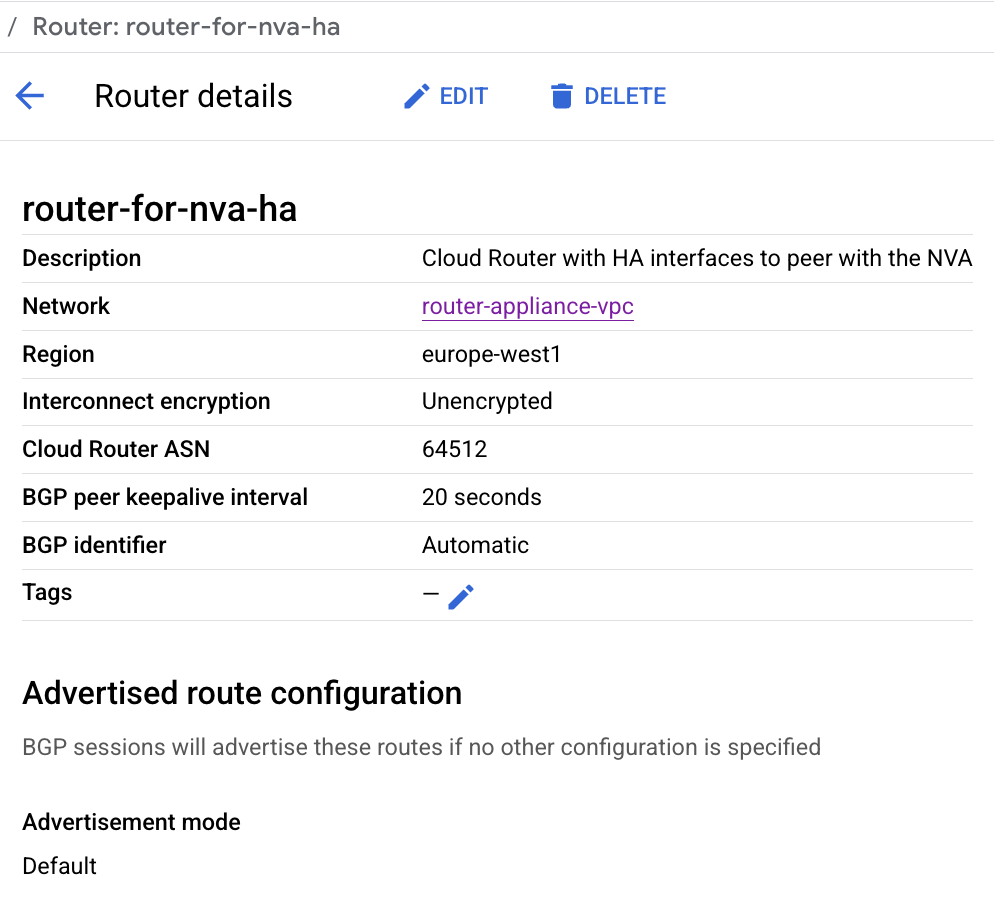
- Create a GCP Cloud Router into the same router appliance subnet. Use AS number 64512 (at least I used this, other private AS numbers can be used).
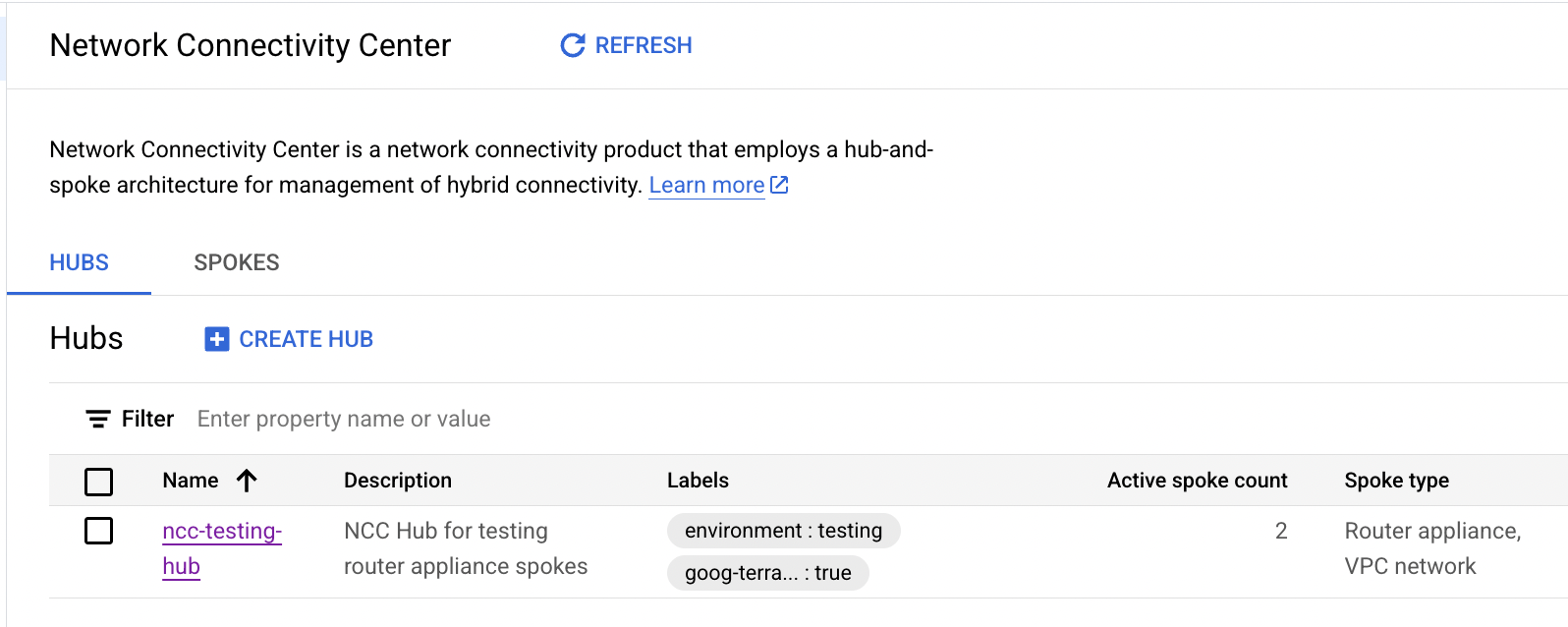
- Create the NCC Hub.
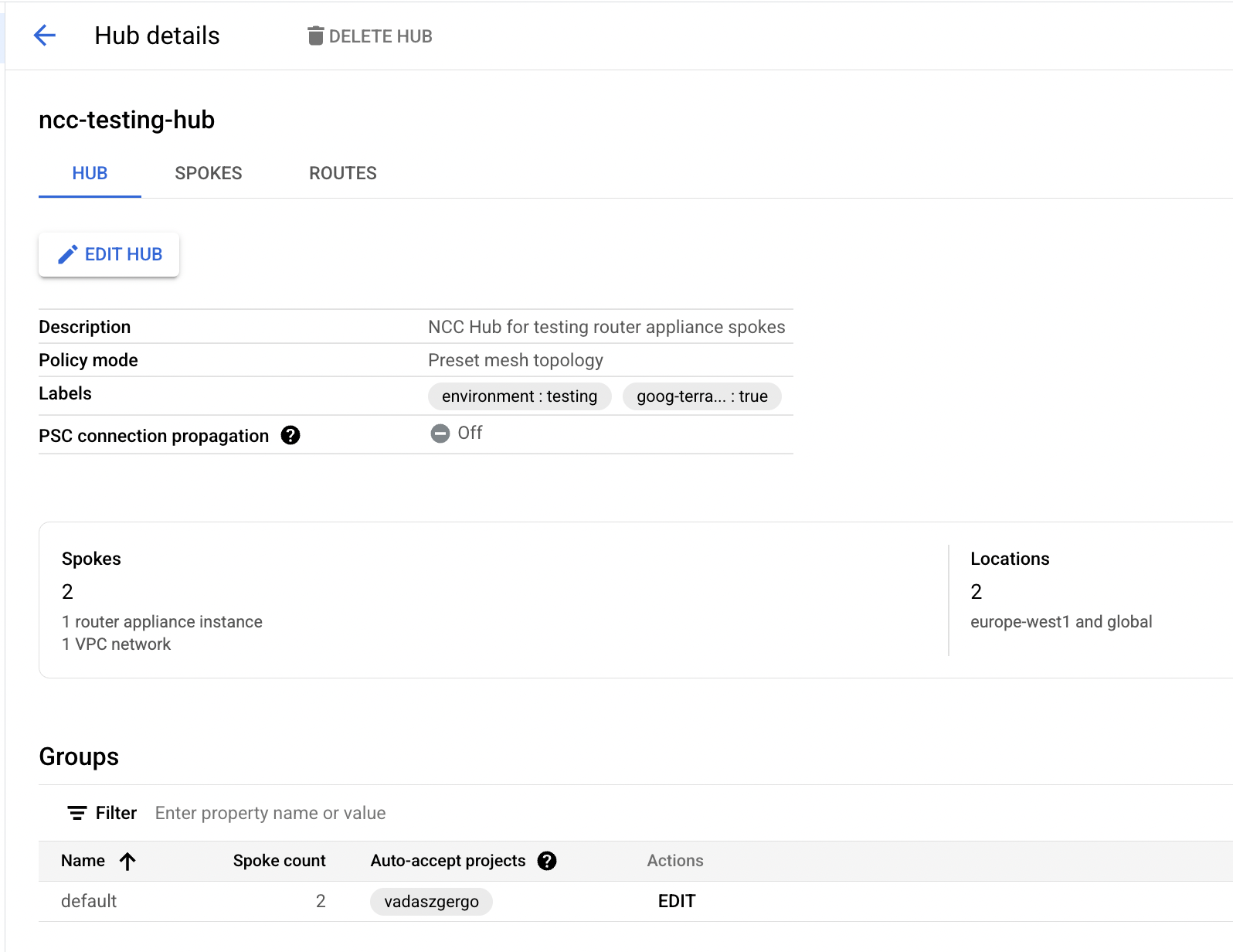
- Create 2 NCC spokes, pick the internal VPC as a VPC spoke, and pick the router appliance VPC as a Router Appliance spoke.
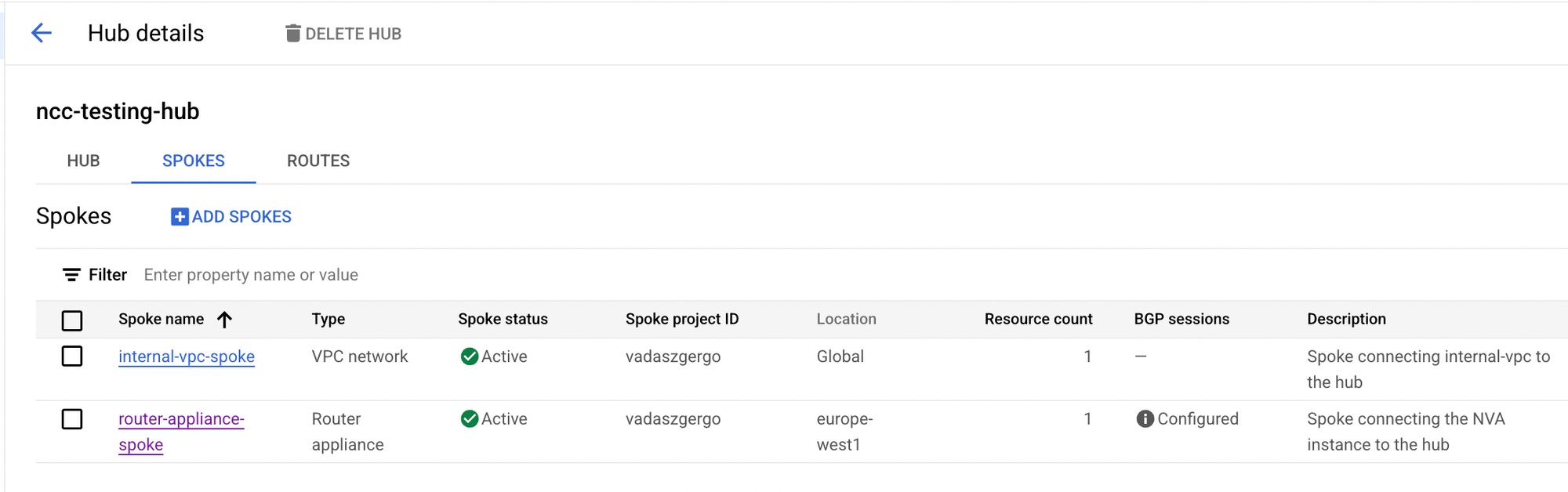
- When adding the Router Appliance spoke, select the router appliance VM, and configure BGP with the Cloud Router. Use AS number 65001 for the Router Appliance.
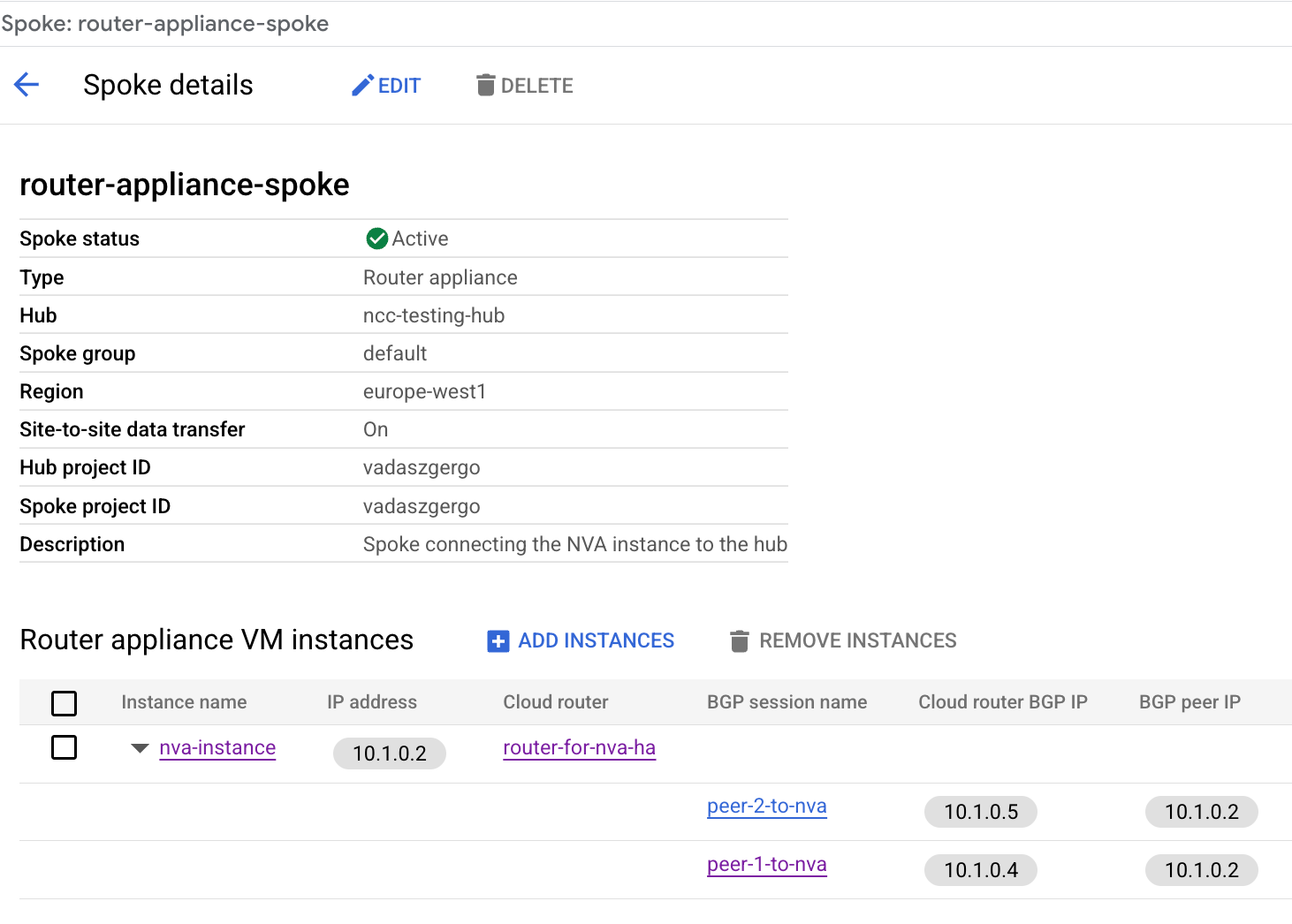
Make a note about the Cloud Router BGP IP addresses, since we need those when we configure the Router Appliance VM.
Configuring the Router Appliance
- Let's SSH to the Router Appliance VM.
For simplicity in this demo, I represent the remote location (192.168.0.0/24) using a loopback interface on the Router Appliance.
- Create a loopback interface with 192.168.0.1/24 IP address, and add an entry to the route table.
// Create loopback ip address
ip addr add 192.168.0.1/24 dev lo

// Add entry to the route table
ip route add 192.168.0.0/24 dev lo


gergo@nva-instance:~$ ip a
1: lo: <LOOPBACK,UP,LOWER_UP> mtu 65536 qdisc noqueue state UNKNOWN group default qlen 1000
    link/loopback 00:00:00:00:00:00 brd 00:00:00:00:00:00
    inet 127.0.0.1/8 scope host lo
       valid_lft forever preferred_lft forever
    inet 192.168.0.1/24 scope global lo

gergo@nva-instance:~$ ip route show
default via 10.1.0.1 dev ens4 proto dhcp src 10.1.0.2 metric 100
10.1.0.0/24 nhid 15 via 10.1.0.1 dev ens4 proto bgp metric 20 onlink
10.1.0.1 dev ens4 proto dhcp scope link src 10.1.0.2 metric 100
169.254.169.254 via 10.1.0.1 dev ens4 proto dhcp src 10.1.0.2 metric 100
192.168.0.0/24 dev lo scope link
- Install FRR and configure BGP with the correct neighbor IPs from the Cloud Router.
// Install FRR
sudo apt install frr

// Enable BGP in FRR
sudo sed -i 's/bgpd=no/bgpd=yes/' /etc/frr/daemons

// Restart FRR to take effect
sudo systemctl restart frr

// Configure BGP
sudo vtysh -c 'conf t' \
-c 'route-map ACCEPT-ALL permit 10' \
-c 'exit' \
-c 'router bgp 65001' \
-c 'neighbor 10.1.0.4 remote-as 64512' \
-c 'neighbor 10.1.0.4 description "GCP Peer 1"' \
-c 'neighbor 10.1.0.4 ebgp-multihop' \
-c 'neighbor 10.1.0.4 disable-connected-check' \
-c 'neighbor 10.1.0.5 remote-as 64512' \
-c 'neighbor 10.1.0.5 description "GCP 2"' \
-c 'neighbor 10.1.0.5 ebgp-multihop' \
-c 'neighbor 10.1.0.5 disable-connected-check' \
-c 'address-family ipv4 unicast' \
-c 'network 192.168.0.0/24' \
-c 'neighbor 10.1.0.4 soft-reconfiguration inbound' \
-c 'neighbor 10.1.0.4 route-map ACCEPT-ALL in' \
-c 'neighbor 10.1.0.4 route-map ACCEPT-ALL out' \
-c 'neighbor 10.1.0.5 soft-reconfiguration inbound' \
-c 'neighbor 10.1.0.5 route-map ACCEPT-ALL in' \
-c 'neighbor 10.1.0.5 route-map ACCEPT-ALL out' \
-c 'end' \
-c 'write'
Verifying Route Exchange
After completing the previous configurations, the BGP neighborship with the Cloud Router should now be established. Routes are being exchanged: Router Appliance advertises the 192.168.0.0/24 range to the Cloud Router.
nva-instance# show ip bgp summary

IPv4 Unicast Summary:
BGP router identifier 192.168.0.1, local AS number 65001 VRF default vrf-id 0
BGP table version 2
RIB entries 3, using 384 bytes of memory
Peers 2, using 47 KiB of memory

Neighbor        V         AS   MsgRcvd   MsgSent   TblVer  InQ OutQ  Up/Down State/PfxRcd   PfxSnt Desc
10.1.0.4        4      64512       101       104        2    0    0 00:32:29            1        2 "GCP Cloud Router
10.1.0.5        4      64512       101       104        2    0    0 00:32:29            1        2 "GCP Cloud Router


nva-instance# show ip bgp
BGP table version is 2, local router ID is 192.168.0.1, vrf id 0
Default local pref 100, local AS 65001
Nexthop codes: @NNN nexthop's vrf id, < announce-nh-self
Origin codes:  i - IGP, e - EGP, ? - incomplete
RPKI validation codes: V valid, I invalid, N Not found

     Network          Next Hop            Metric LocPrf Weight Path
 *>  10.1.0.0/24      10.1.0.1               100             0 64512 ?
 *=                   10.1.0.1               100             0 64512 ?
 *>  192.168.0.0/24   0.0.0.0                  0         32768 i

Displayed 2 routes and 3 total paths


nva-instance# show ip route
Codes: K - kernel route, C - connected, L - local, S - static,
       R - RIP, O - OSPF, I - IS-IS, B - BGP, E - EIGRP, N - NHRP,
       T - Table, v - VNC, V - VNC-Direct, A - Babel, F - PBR,
       f - OpenFabric, t - Table-Direct,
       > - selected route, * - FIB route, q - queued, r - rejected, b - backup
       t - trapped, o - offload failure

IPv4 unicast VRF default:
K>* 0.0.0.0/0 [0/100] via 10.1.0.1, ens4, src 10.1.0.2, weight 1, 00:33:03
B>  10.1.0.0/24 [20/100] via 10.1.0.1 (recursive), weight 1, 00:33:00
  *                        via 10.1.0.1, ens4 onlink, weight 1, 00:33:00
                         via 10.1.0.1 (recursive), weight 1, 00:33:00
                           via 10.1.0.1, ens4 onlink, weight 1, 00:33:00
K>* 10.1.0.1/32 [0/100] is directly connected, ens4, weight 1, 00:33:03
L * 10.1.0.2/32 is directly connected, ens4, weight 1, 00:06:32
C>* 10.1.0.2/32 [0/100] is directly connected, ens4, weight 1, 00:06:32
K>* 169.254.169.254/32 [0/100] via 10.1.0.1, ens4, src 10.1.0.2, weight 1, 00:33:03
C>* 192.168.0.0/24 is directly connected, lo, weight 1, 00:33:01
L>* 192.168.0.1/32 is directly connected, lo, weight 1, 00:33:01
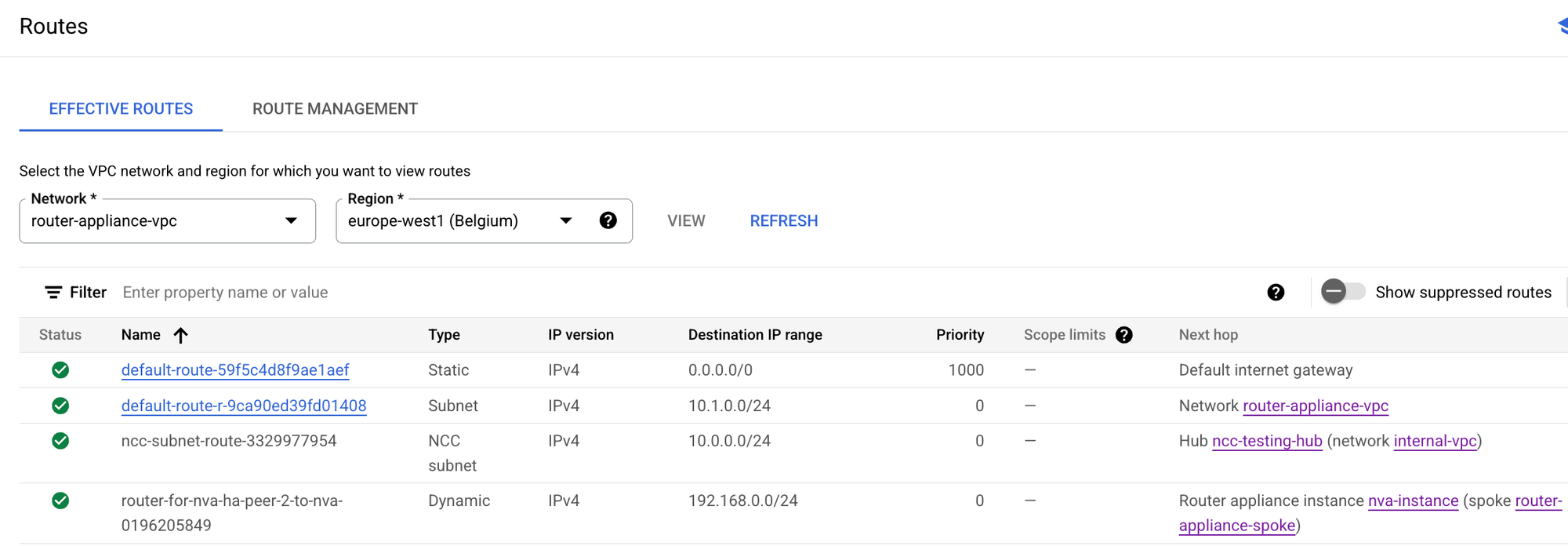
We can see in Google Cloud Console that routes are in place. In the router appliance VPC routing table, we see NCC Hub advertises the internal VPC with the next hop as the NCC Hub and the Router Appliance advertises 192.168.0.0/24 with the next hop as itself.
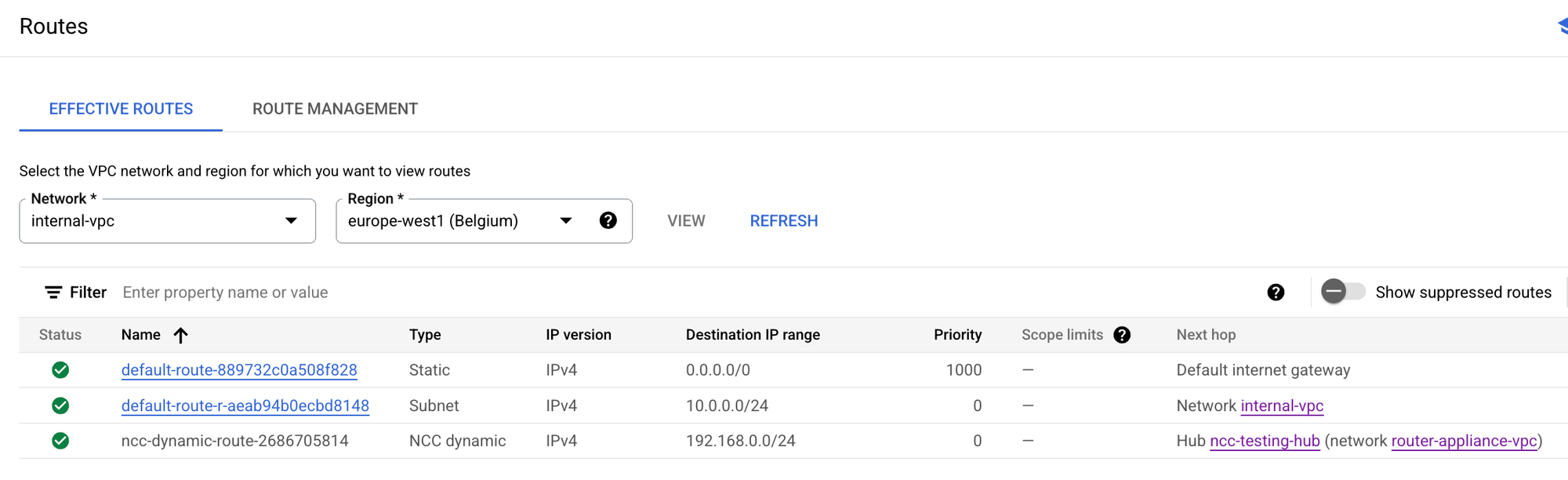
In the Internal VPC routing table, we see that 192.168.0.0/24 is being advertised with the next hop as the NCC Hub.
If the VPC firewall rules allow (in my case I allowed any source, any destination on any port), then we can successfully test connectivity from the internal VM to the remote location, namely ping 192.168.0.1 works.
gergo@internal-vm:~$ ping 192.168.0.1
PING 192.168.0.1 (192.168.0.1) 56(84) bytes of data.
64 bytes from 192.168.0.1: icmp_seq=1 ttl=64 time=0.823 ms
64 bytes from 192.168.0.1: icmp_seq=2 ttl=64 time=0.336 ms
64 bytes from 192.168.0.1: icmp_seq=3 ttl=64 time=0.268 ms
Conclusion
In this blog post, we configured Google Cloud Network Connectivity Center (NCC) with a Router Appliance, in order to exchange routes between remote locations and other Google Cloud VPCs.
NCC is a powerful tool, which can simplify networking setup and operation in Google Cloud.
Feel free to expand this demo by adding more VPCs, additional Cloud Routers, or simulating failover scenarios.
Use Terraform to test this in your own environment
As usual, I like to provide a quick and easy way for people who are interested in testing this setup.
You can access the full Terraform code below by signing up for a quick and free subscription on my website. With just a simple terraform apply, the entire setup—NCC hub, spokes, Router Appliance, Cloud Router, and VMs, even the BGP routing—will be provisioned automatically. No manual steps required from you in the Google Cloud Console.