Hub-and-Spoke Topology with Azure Firewall - Deployment Guide with Terraform

Enterprise organizations often rely on hub-and-spoke topologies for their cloud networks. This design simplifies network management, enables centralized traffic filtering, and provides a single point of connectivity to and from the internet. In Azure, Azure Firewall is frequently the go-to solution for implementing such a centralized security model.
In this article, we’ll walk through a simplified hub-and-spoke architecture where Azure Firewall handles both north-south (internet-bound) and east-west (inter-spoke) traffic filtering.
What is hub and spoke topology?
A hub-and-spoke topology is a network design where a central hub acts as the main connection point, and all other networks (the spokes) connect to it. In Azure, this model allows the hub to host shared services - such as firewalls, VPN gateways, or monitoring tools - while the spokes contain workloads that rely on the hub for connectivity and security.
Imagine you have two virtual networks in Azure and want them to communicate with each other. A simple peering connection is enough to achieve that. However, if you scale this setup to 40 or 50 virtual networks, creating and managing individual peerings between each one quickly becomes complex and error-prone. By introducing a single hub network that all spoke networks connect to, you centralize connectivity and greatly simplify network management.
This hub becomes the single place where shared services (such as firewalls, VPN gateways, or DNS/monitoring tools) are deployed, making management far simpler.
From a security perspective, the hub is the ideal location for enforcing policies. You can inspect both north-south traffic (inbound and outbound to the internet) and east-west traffic (between spokes) without having to replicate controls in every network. This centralized approach reduces cost and complexity, while ensuring consistent governance across the environment.
For enterprises with many workloads, this model also improves scalability. Adding a new spoke network doesn’t require reworking dozens of peerings - just connect it to the hub and it’s ready to communicate securely with the rest of the environment.
Azure Firewall as a Central Security Solution
Azure Firewall is a managed, cloud-native network security service that is designed to control and log traffic across your Azure environment. In a hub-and-spoke topology, it plays a key role as the enforcement point for both inbound and outbound connections, as well as for traffic moving laterally between spokes.
By placing the firewall in the hub, you gain:
- Centralized traffic inspection - All internet-bound and inter-spoke communication passes through the hub, where policies are enforced consistently.
- Scalability and resilience - Azure Firewall is highly available by default and can scale automatically to handle increased traffic.
- Simplified operations - Instead of deploying and managing firewalls in each spoke, you manage rules in a single, central place.
- Advanced protection - With features like Threat Intelligence-based filtering, FQDN filtering, and Application Rules, Azure Firewall can block malicious traffic and enforce corporate security standards.
In our example topology, Azure Firewall will handle both north-south (internet ↔ spoke) and east-west (spoke ↔ spoke) filtering. This ensures that workloads in the spokes are protected against external threats and that communication between workloads remains tightly controlled.
Implementing Hub-and-Spoke with Central Azure Firewall in Terraform
To demonstrate how this works in practice, I built a simplified hub-and-spoke topology in Azure and automated everything with Terraform. The architecture follows a central firewall design where both north-south (internet) and east-west (spoke-to-spoke) traffic flows are inspected by the Azure Firewall before reaching their destination.
The setup looks like this:
- Hub VNet (
10.0.0.0/16)
Contains theAzureFirewallSubnetand the Azure Firewall with a dedicated public IP. The firewall acts as the central inspection point for all traffic. - Spoke VNets
- Spoke 1:
192.168.0.0/16with a single subnet192.168.1.0/24 - Spoke 2:
172.16.0.0/16with a single subnet172.16.1.0/24
Each spoke hosts a small Ubuntu VM for testing connectivity.
- Spoke 1:
- VNet Peerings
The hub is peered with each spoke (Hub ↔ Spoke1, Hub ↔ Spoke2). Peering is configured to allow forwarded traffic, ensuring that traffic from the spokes can be routed through the hub firewall. - Routing
Each spoke subnet has a user-defined route (0.0.0.0/0) that points to the private IP of the Azure Firewall (next hop = Virtual Appliance). This forces all outbound traffic, whether to the internet or to other spokes, through the firewall.
A specific exception route (1.2.3.4/32→ Internet) is added so that you can SSH directly from your own public IP to the test VMs without passing through the firewall (this is not recommended in production environment). - Firewall Rules
The Azure Firewall is configured to allow:- ICMP and TCP (22/80/443) traffic between the two spoke subnets in both directions.
- TCP 80/443 traffic from both spokes to the internet.
With these rules, the firewall handles both spoke-to-spoke communication and secure internet egress.
- Testing VMs
Each spoke contains a small Linux VM with a public IP. These VMs make it possible to test connectivity, firewall inspection, and routing behavior. Public IP on them is only needed to make ssh to them easier.
The following diagram illustrates the setup:
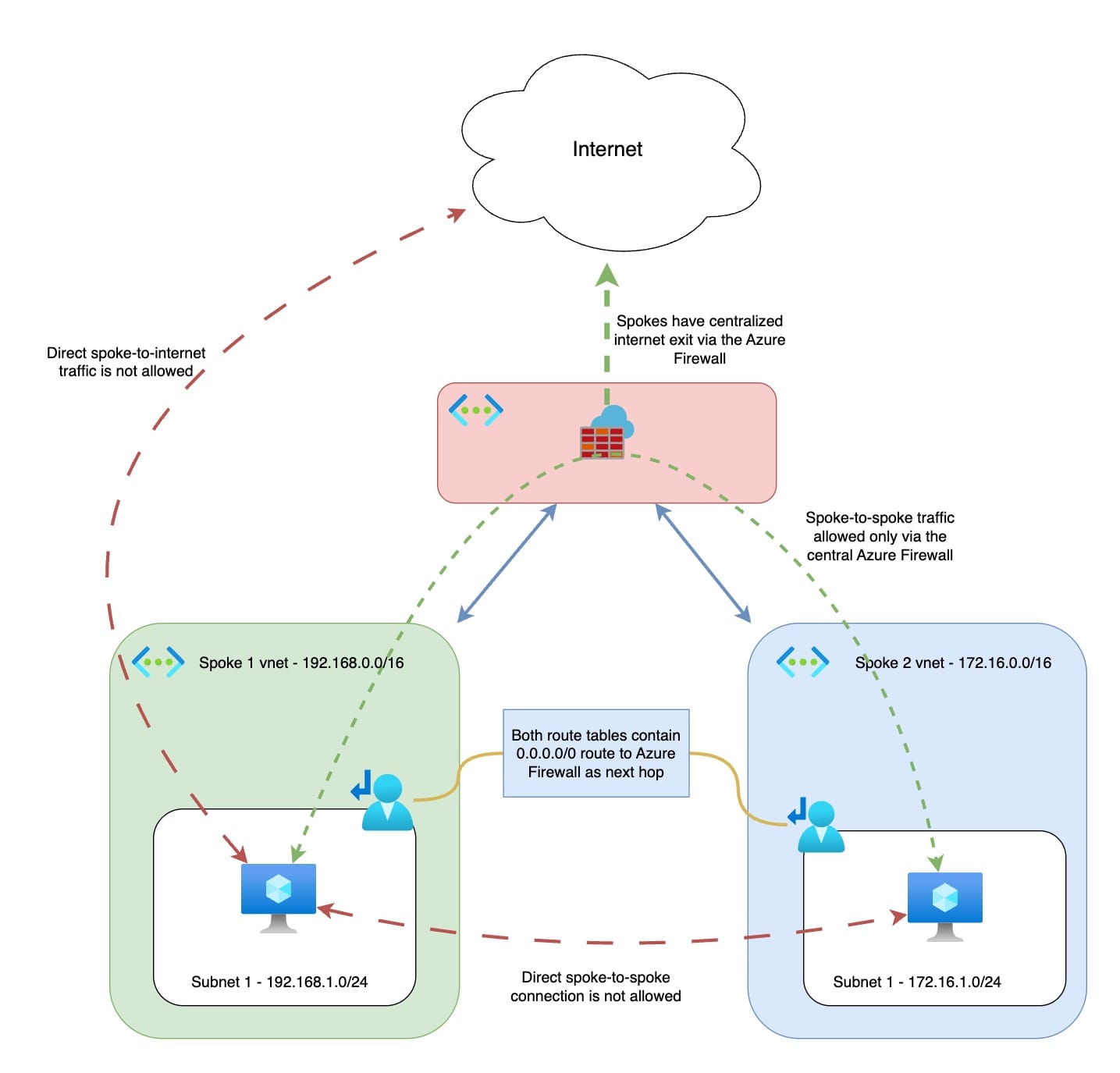
With this configuration:
- Direct spoke-to-internet traffic is blocked (must go through the firewall).
- Direct spoke-to-spoke communication is blocked (must go through the firewall).
- The firewall provides a single point for logging, monitoring, and applying security policies.
The Hidden Challenge: Azure Firewall SNAT Port Exhaustion
When evaluating Azure Firewall for production workloads, it’s important to understand its limitations. One of the less obvious but critical ones is SNAT port exhaustion.
By design, an Azure Firewall instance with a single public IP provides 2,496 SNAT ports per backend virtual machine. Since the firewall is deployed as a minimum of two instances, this gives you about 4,992 ports per public IP by default.
This can quickly become insufficient if your workloads are “chatty” - for example, handling large volumes of short-lived API connections.
To scale, you can attach up to 250 public IP addresses to a single Azure Firewall, which increases the total available ports. However, this introduces two challenges:
- Cost - maintaining 250 public IPs is expensive.
- Complexity - external partners who need to whitelist your firewall must allow all 250 IPs (or 16 prefixes), which is operationally difficult.
A more practical solution is to combine Azure Firewall with a NAT Gateway. NAT Gateway provides 64,512 SNAT ports per public IP, and supports up to 16 public IPs, giving you over 1 million ports that are efficiently pooled across the subnet. This offloads outbound connectivity from the firewall, leaving it to focus on filtering and security.
You can find more information in the official Azure Documentation here:
 asudbring
Terraform Code to Test Azure Firewall in a Hub-and-Spoke Topology
As with my other articles, I’ve prepared a fully working Terraform setup that you can use to deploy and test this hub-and-spoke architecture with Azure Firewall.
Subscribers can access the full Terraform code below. If you haven’t subscribed yet, it’s free and only takes a minute.
If you run into any issues during deployment, or have questions about extending the setup to your own environment, feel free to reach out - I’ll be happy to help.