Hybrid DNS with GCP Network Connectivity Center and Enterprise IPAM
Looking to dive deeper into GCP NCC and Router Appliance setup? Use the button below to read the full guide.
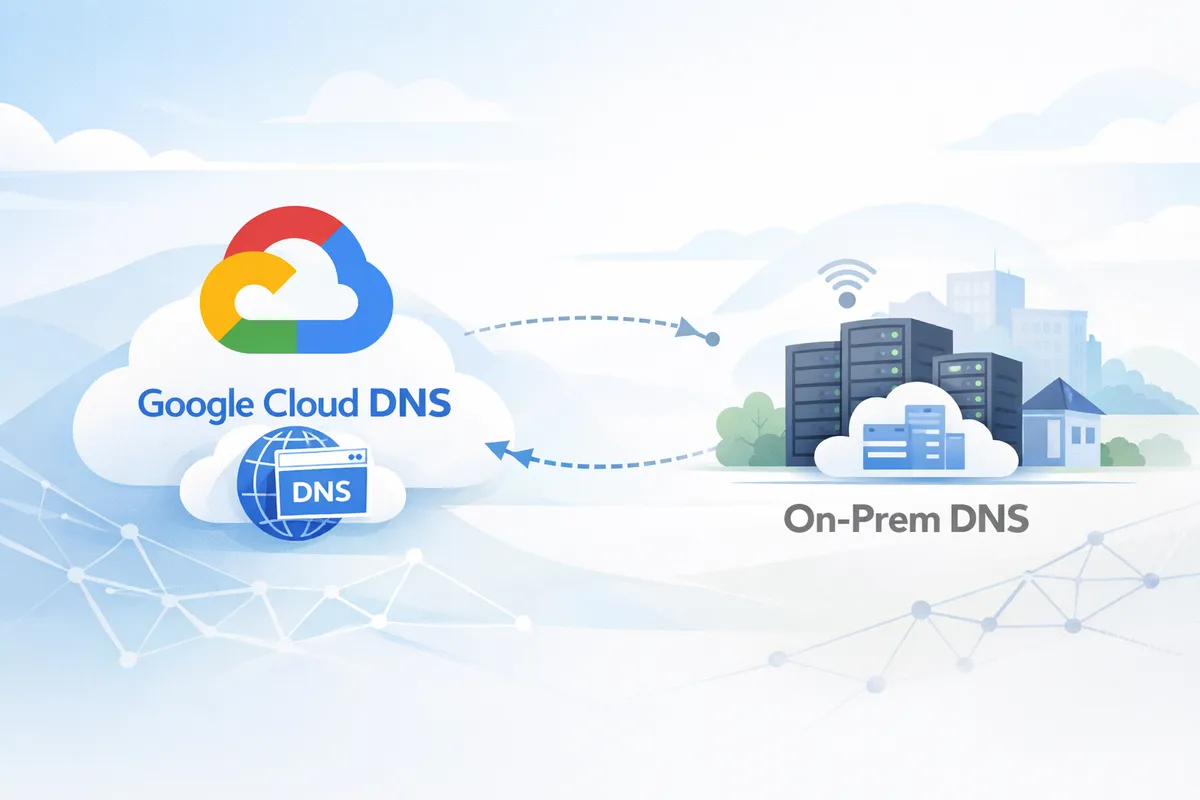
I recently worked through a hybrid DNS design for a Google Cloud environment with some interesting constraints that I think are worth writing up. The setup involved a company-wide on-prem DNS system built on an enterprise IPAM platform (think Infoblox, EfficientIP, or BlueCat) with two hard requirements. First, security policies and routing consistency requirements prohibited DNS queries originating from Google’s public IP ranges. The firewalls were configured to reject traffic from public sources into trusted DNS zones, and making an exception was not on the table. Second, the IPAM had to remain the single source of truth for all DNS records, including zones for GCP-hosted workloads. Deploying and maintaining virtual machines in GCP was an acceptable tradeoff if that was the only way to make it work.
It turned out that VMs were the only option. This post deep-dives into the networking and DNS architecture behind the solution. To make this actionable, I’ve provided the full Terraform implementation at the end so you can spin up this design in your own sandbox.
How DNS works in Google Cloud
By default, every Compute Engine instance uses the VPC-internal DNS resolver, accessible via the metadata address 169.254.169.254. When a VM makes a DNS query, it is handled by Cloud DNS, which resolves it based on the VPC network the VM is connected to.
Cloud DNS supports several zone types:
- Private zones: Cloud DNS is authoritative and hosts the records directly. You create A records, CNAMEs, etc. in Cloud DNS, and they are visible to VMs in the authorized VPC networks.
- Forwarding zones: Cloud DNS does not resolve the query itself. Instead, it forwards the query to a target name server (a specific IP address). When using private routing, the query leaves Cloud DNS with a source IP from the
35.199.192.0/19range. - Peering zones: Cloud DNS delegates resolution of a zone to another VPC network's DNS context. This is a metadata-plane operation; no actual DNS packets are sent between VPCs. Cloud DNS simply evaluates the query as if it came from the target VPC.
The distinction between forwarding and peering is critical for multi-VPC architectures, and we will come back to why shortly.
The 35.199.192.0/19 source IP
Cloud DNS forwarding zones support two routing modes: standard and private. With standard forwarding, the source IP depends on the target: queries to public IPs come from Google's public ranges, while queries to RFC 1918 addresses come from the 35.199.192.0/19 range. By selecting private forwarding (forwarding_path = "private"), we force Cloud DNS to route all queries through the VPC network using the 35.199.192.0/19 source range, regardless of the target IP type. Two important things about the this range:
- It has a special route in every VPC: Google Cloud automatically installs a non-removable route for
35.199.192.0/19in every VPC network. This route points to Cloud DNS within that VPC's own context. It is not visible in the route table and cannot be modified, removed, or exchanged between VPCs via NCC or VPC peering. - On-prem firewalls often block it: Enterprise DNS servers typically sit in a trusted network zone. Security teams do not allow DNS queries arriving from a public IP range into these zones, regardless of whether the range is actually routable on the internet. If your on-prem DNS server receives a query from
35.199.192.0/19, the firewall in front of it will likely drop it.
Why we need this solution
This setup addresses a specific scenario that is common in large enterprises:
Problem 1: On-prem firewalls reject Cloud DNS forwarding queries.
If you create a Cloud DNS forwarding zone with private routing that targets an on-prem DNS server, the queries arrive at on-prem from 35.199.192.0/19. The on-prem firewall blocks them. You cannot change the source IP; this is how Cloud DNS private forwarding works.
Problem 2: The IPAM solution must remain the single source of truth.
The organization runs an IPAM platform (Infoblox, EfficientIP, BlueCat) that manages all DNS records, for on-prem zones, cloud zones, and everything in between. They do not want to maintain records in two places (Cloud DNS and IPAM). They want one authoritative source, and that source is their IPAM.
The solution: Deploy an IPAM grid member (simulated here as a BIND VM) inside GCP that:
- Is authoritative for GCP zones like
gcp.example.com - Forwards on-prem zone queries to the on-prem DNS server using its own private IP
- Receives all DNS queries from GCP workloads via Cloud DNS forwarding
- Receives GCP zone queries from on-prem via conditional forwarding
Cloud DNS acts as a resolution control plane and routing layer. It has no authoritative zones. It only peers and forwards queries to the IPAM grid member.
Network topology
The setup uses three VPC networks connected through Google Cloud's Network Connectivity Center (NCC).
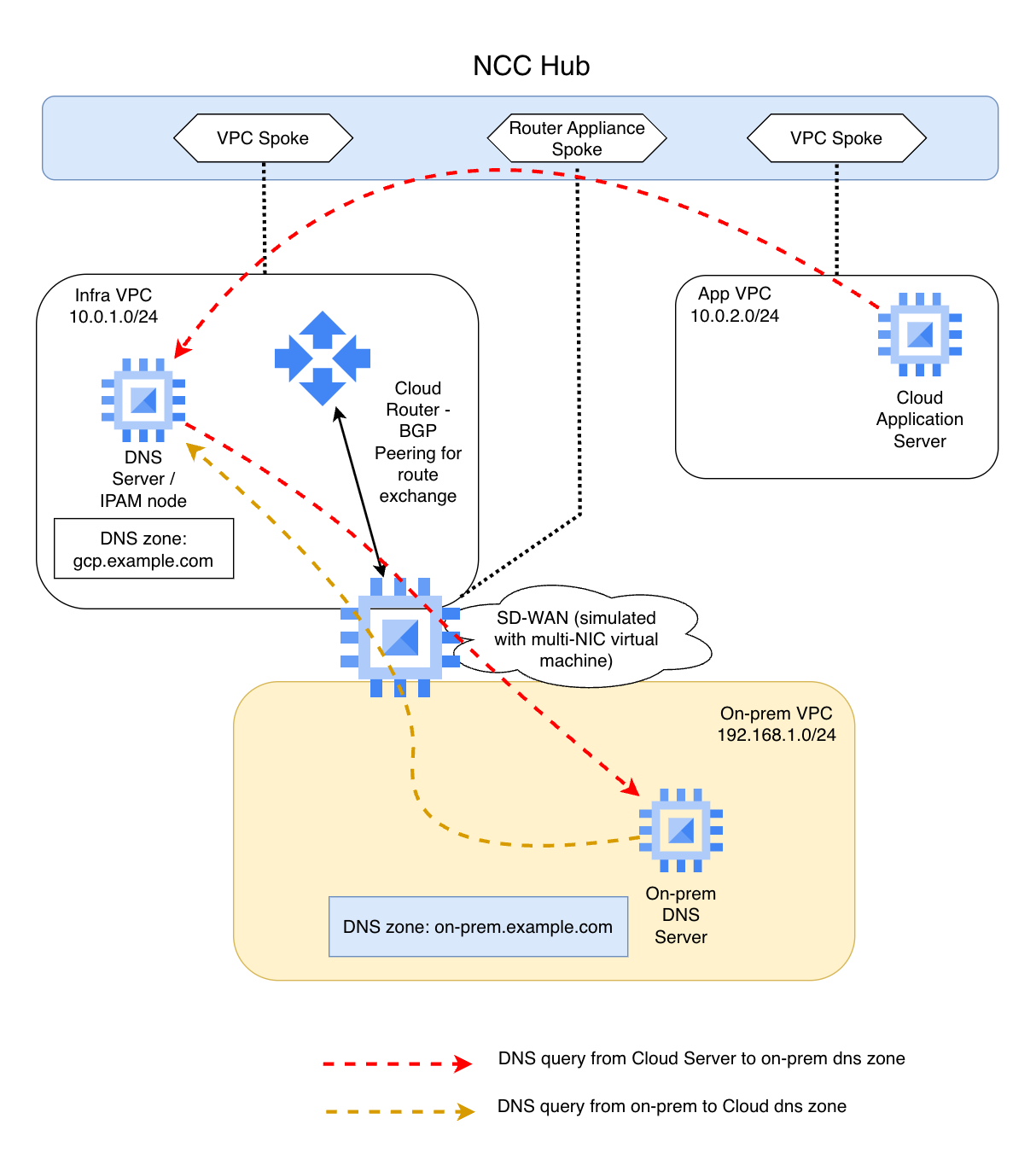
NCC hub-and-spoke setup
Network Connectivity Center (NCC) enables transitive connectivity between spokes (effectively full-mesh with proper route propagation):
- Infra VPC Spoke: Hosts the DNS VM (IPAM grid member) and the SD-WAN VM. This is the central VPC where DNS forwarding zones live.
- App VPC Spoke: Hosts application workloads. VMs here query DNS through Cloud DNS, which peers to the Infra VPC for resolution.
- SD-WAN Router Appliance Spoke: The SD-WAN VM, which physically resides in the Infra VPC, is separately registered in NCC as a router appliance spoke. This is an NCC construct, not a separate VPC. It runs FRR (Free Range Routing) and peers BGP with the NCC Cloud Router (ASN 64515 <-> 64514). It advertises the on-prem subnet
192.168.1.0/24to NCC, which propagates the route to all spoke VPCs.
The SD-WAN VM has two network interfaces: NIC0 in the Infra VPC (for BGP peering with NCC) and NIC1 in the On-Prem VPC (simulating the WAN link to the data center). IP forwarding is enabled so it can route traffic between the two networks.
NCC route exchange ensures that all VPCs learn about each other's subnets. The App VPC knows how to reach 192.168.1.0/24 (on-prem) via the SD-WAN VM, and the On-Prem VPC knows how to reach 10.0.1.0/24 and 10.0.2.0/24 (GCP) via the same path.
Cloud DNS peering and forwarding setup
Cloud DNS is configured with four managed zones: two peering zones and two forwarding zones. There are no private (authoritative) zones in Cloud DNS at all (at least in this setup).
Peering zones (in App VPC):
| Zone | DNS Name | From | To |
|---|---|---|---|
gcp-dns-peering |
gcp.example.com |
App VPC | Infra VPC |
onprem-dns-peering |
on-prem.example.com |
App VPC | Infra VPC |
Forwarding zones (in Infra VPC):
| Zone | DNS Name | Target |
|---|---|---|
gcp-dns-forwarding |
gcp.example.com |
DNS VM (10.0.1.10) |
onprem-dns-forwarding |
on-prem.example.com |
DNS VM (10.0.1.10) |
Both forwarding zones use forwarding_path = "private" to ensure queries are routed through the VPC network, not over the internet.
Why peering instead of forwarding from the App VPC?
You might wonder why not just create forwarding zones in the App VPC pointing to the DNS VM in the Infra VPC. That would be simpler (one hop instead of two).
35.199.192.0/19 return path behavior.When Cloud DNS uses a forwarding zone with private routing, it sends the query from 35.199.192.0/19. Every VPC has a special, non-removable route for this range that points back to that VPC's own Cloud DNS context. This route is not exchanged between VPCs, not through NCC, not through VPC peering, not through anything.
If the App VPC forwards a query to the DNS VM in the Infra VPC, the query packet arrives at the DNS VM with a source IP from 35.199.192.0/19. The DNS VM processes the query and sends the response back to 35.199.192.0/19. But in the Infra VPC, the special route for 35.199.192.0/19 points to the Infra VPC's own Cloud DNS, not back to the App VPC's Cloud DNS that originated the query. The response is delivered to the local Infra VPC’s Cloud DNS context rather than the App VPC’s originating context, resulting in a silent drop.
DNS peering solves this entirely. When the App VPC has a peering zone for gcp.example.com targeting the Infra VPC, Cloud DNS does not send any packets. It evaluates the query in the Infra VPC's DNS context, as if the query came from a VM in the Infra VPC. The Infra VPC's forwarding zone kicks in, the query goes to the DNS VM, the response comes back to 35.199.192.0/19 in the Infra VPC (where the route is correct), and Cloud DNS returns the answer to the App VM. This eliminates all cross-VPC return path issues.
This is documented in Google Cloud's VPC routing documentation:
- https://cloud.google.com/vpc/docs/routes#cloud-dns
- https://cloud.google.com/dns/docs/zones/forwarding-zones
Traffic flows
Flow 1: GCP workload resolves a GCP hostname
A VM in the App VPC queries app-server.gcp.example.com.
App VM (10.0.2.10)
  |
  | dig app-server.gcp.example.com
  v
Cloud DNS (169.254.169.254) -- App VPC context
  |
  | Peering zone: gcp.example.com -> Infra VPC
  | (metadata-plane delegation, no packets sent)
  v
Cloud DNS -- Infra VPC context
  |
  | Forwarding zone: gcp.example.com -> 10.0.1.10
  | Source IP: 35.199.192.0/19
  v
DNS VM / IPAM (10.0.1.10)
  |
  | Authoritative zone: gcp.example.com
  | Looks up local zone file -> app-server = 10.0.2.10
  v
Response: 10.0.2.10
  |
  | Returns to 35.199.192.0/19 (Infra VPC route, correct context)
  v
Cloud DNS returns answer to App VM
The query never leaves GCP. Cloud DNS peers, then forwards to the DNS VM, which resolves from its local authoritative zone.
Flow 2: GCP workload resolves an on-prem hostname
A VM in the App VPC queries app1.on-prem.example.com.
App VM (10.0.2.10)
  |
  | dig app1.on-prem.example.com
  v
Cloud DNS (169.254.169.254) -- App VPC context
  |
  | Peering zone: on-prem.example.com -> Infra VPC
  v
Cloud DNS -- Infra VPC context
  |
  | Forwarding zone: on-prem.example.com -> 10.0.1.10
  | Source IP: 35.199.192.0/19
  v
DNS VM / IPAM (10.0.1.10)
  |
  | Forward zone: on-prem.example.com -> 192.168.1.10
  | Source IP: 10.0.1.10 (private IP, on-prem firewall allows this)
  | Path: via SD-WAN VM (NCC router appliance, BGP-learned route)
  v
On-Prem DNS (192.168.1.10)
  |
  | Authoritative zone: on-prem.example.com
  | app1 = 192.168.1.50
  v
Response travels back the same path
This is the key flow. The on-prem DNS server sees the query arriving from 10.0.1.10, a private RFC1918 address. It never sees 35.199.192.0/19. The on-prem firewall is happy.
Flow 3: On-prem resolves a GCP hostname
An on-prem client queries app-server.gcp.example.com.
On-Prem Client
  |
  | dig app-server.gcp.example.com
  v
On-Prem DNS (192.168.1.10)
  |
  | Conditional forwarder: gcp.example.com -> 10.0.1.10
  | Path: via SD-WAN VM (static route in on-prem VPC)
  v
DNS VM / IPAM (10.0.1.10)
  |
  | Authoritative zone: gcp.example.com
  | app-server = 10.0.2.10
  v
Response: 10.0.2.10
  |
  | Returns to on-prem DNS via SD-WAN VM
  v
On-prem client receives answer
The DNS VM resolves this locally because it is authoritative for gcp.example.com. There is no dependency on Cloud DNS for this flow. The IPAM grid member holds the zone, and on-prem queries it directly.
Flow summary
| From | To | Zone | Path |
|---|---|---|---|
| App VM | GCP hostname | gcp.example.com |
Cloud DNS peer -> forward -> DNS VM (authoritative) |
| App VM | On-prem hostname | on-prem.example.com |
Cloud DNS peer -> forward -> DNS VM -> on-prem DNS |
| On-prem | GCP hostname | gcp.example.com |
On-prem DNS -> DNS VM (authoritative) |
| On-prem | On-prem hostname | on-prem.example.com |
On-prem DNS (authoritative, local) |
In every flow, the DNS VM (IPAM grid member) is the central point. Cloud DNS is just a routing layer that gets queries to the right place. The IPAM owns all the records.
Key design decisions
No Cloud DNS private zones. In a typical GCP setup, you would create a Cloud DNS private zone for gcp.example.com and manage records there. In this setup, we deliberately avoid that. The IPAM is the single source of truth. Cloud DNS only peers and forwards.
DNS peering is mandatory for cross-VPC resolution. You cannot create a forwarding zone in one VPC that targets a name server in another VPC because the 35.199.192.0/19 return path breaks. Every spoke VPC must peer to the Infra VPC, which then forwards to the DNS VM. This is a GCP networking constraint, not a design preference.
The DNS VM uses its private IP for on-prem queries. This is the whole point of the setup. The DNS VM's queries to on-prem originate from 10.0.1.10, not from 35.199.192.0/19. Enterprise firewalls accept private source IPs into trusted DNS zones.
NCC provides the hybrid routing. The SD-WAN VM advertises on-prem routes (192.168.1.0/24) to NCC via BGP. NCC propagates these routes to all spoke VPCs. Without NCC (or a similar routing mechanism, like a VPN tunnel or some Interconnect), the DNS VM would not be able to reach the on-prem DNS server.
Test this in your own lab
Ready to see this architecture in action? The complete Terraform codebase is available below for my subscribers. Join the community with a free subscription to unlock the repository link. Once you're in, a simple terraform apply will spin up the entire environment, from the NCC hub to the DNS VM, so you can spend less time configuring and more time testing.
As always, I'm happy to hear your experience with this or similar designs. Write a comment, or send me an email.