AWS and Azure Multicloud Interconnect: Hands-On First Impressions
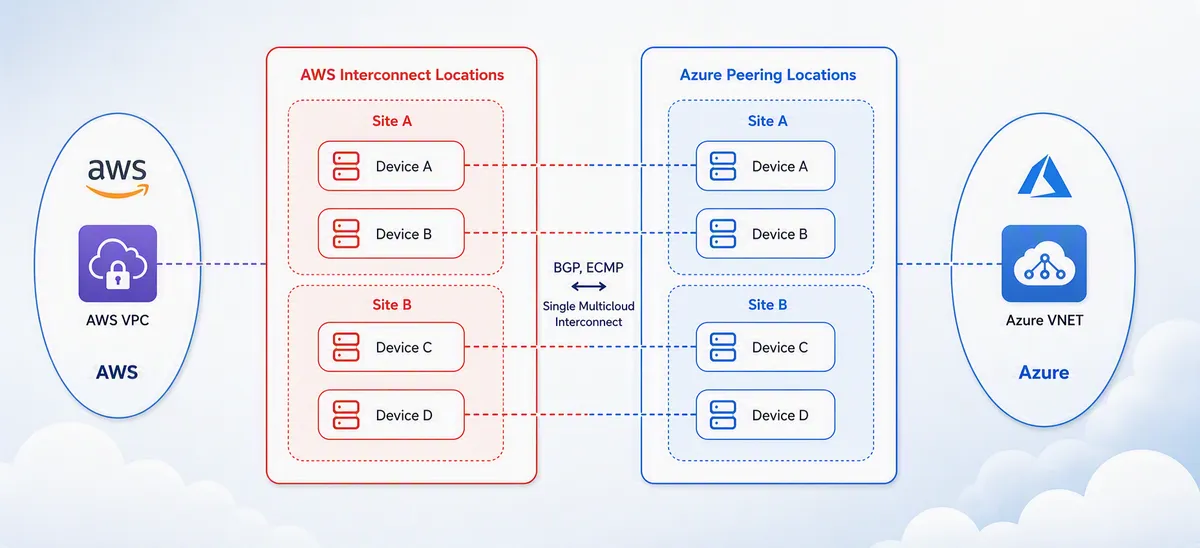
I'm a little late to this party. Azure and AWS announced their direct interconnect offering around the end of August 2026, but I hadn't had time to explore and test it until now. Given the success of similar multicloud solutions, like the direct integration between AWS and Google Cloud, I expected a seamless experience, and it mostly delivered: the whole setup took about 60 minutes.
One important note up front: on the Azure side this service is still in Preview. At the time of writing it supports only AWS as a partner, only 1 Gbps bandwidth, and only connections within local regions (no cross-region connectivity). Check the availability and limits page for the current list of supported regions.
What is Azure–AWS Multicloud Interconnect?
This may be familiar to anyone working in cloud networking, but here is a short recap.
Multicloud Interconnect is a private way to connect two cloud networks together. Instead of VPN tunnels over the internet, it uses the clouds' private connectivity services: ExpressRoute on Azure, Direct Connect on AWS, Cloud Interconnect on GCP and FastConnect on OCI. They are different names for the same idea.
Private connectivity needs a physical location where both cloud providers are present. Neither Microsoft nor AWS says where, but presumably these are colocation facilities where both have a presence. Normally you would order a cross-connect from a service provider, then set up virtual routers, VLANs, point-to-point addressing and BGP sessions yourself. With Multicloud Interconnect, the cloud providers have automated all of this on top of prebuilt capacity. AWS publishes the API specification openly, and Azure and Google Cloud are adopting it. Provisioning is done through an activation key: one side generates it, the other redeems it, and both sides validate that region, bandwidth and account match before anything is built.
This also differs from the older Oracle Interconnect for Azure, where you still configure the peering and routing on both sides yourself.
Once it's up, you have a private connection with dedicated bandwidth between cloud A and cloud B. Predictable bandwidth and latency are a big improvement over a VPN tunnel over the internet, but as usual this comes with a price tag. It is not cheap.
Where is it available?
During the preview, the interconnect only works between specific Azure and AWS region pairs, each tied to a physical interconnect location. These are the pairs available at the time of writing:
| Location | Azure region | AWS region |
|---|---|---|
| Ashburn, Virginia (IAD) | US East | US East (N. Virginia), us-east-1 |
| Silicon Valley | US West | US West (N. California), us-west-1 |
| Frankfurt | Germany West Central | Europe (Frankfurt), eu-central-1 |
| Sydney | Australia East | Asia Pacific (Sydney), ap-southeast-2 |
What does it cost?
On the AWS side, you are charged hourly per interconnect, based on the bandwidth and a distance-based pricing tier. There are no per-GB data transfer charges. Billing starts when you create the interconnect, stops when you delete it, and is rounded up to the full hour. For my 1 Gbps interconnect in the Frankfurt region, the price is $1.37 per hour, which is roughly $1000 per month (see the AWS pricing page).
AWS also provides one free 500 Mbps interconnect per cloud service provider, per Region. Since I used 1 Gbps, it didn't apply to this lab.
On the Azure side, Microsoft says Multicloud Interconnect is free while in public preview, with pricing details to be provided once it becomes generally available. The Azure ExpressRoute gateway is a separate resource, so that will cost for sure.
Lab: Deploying the interconnect
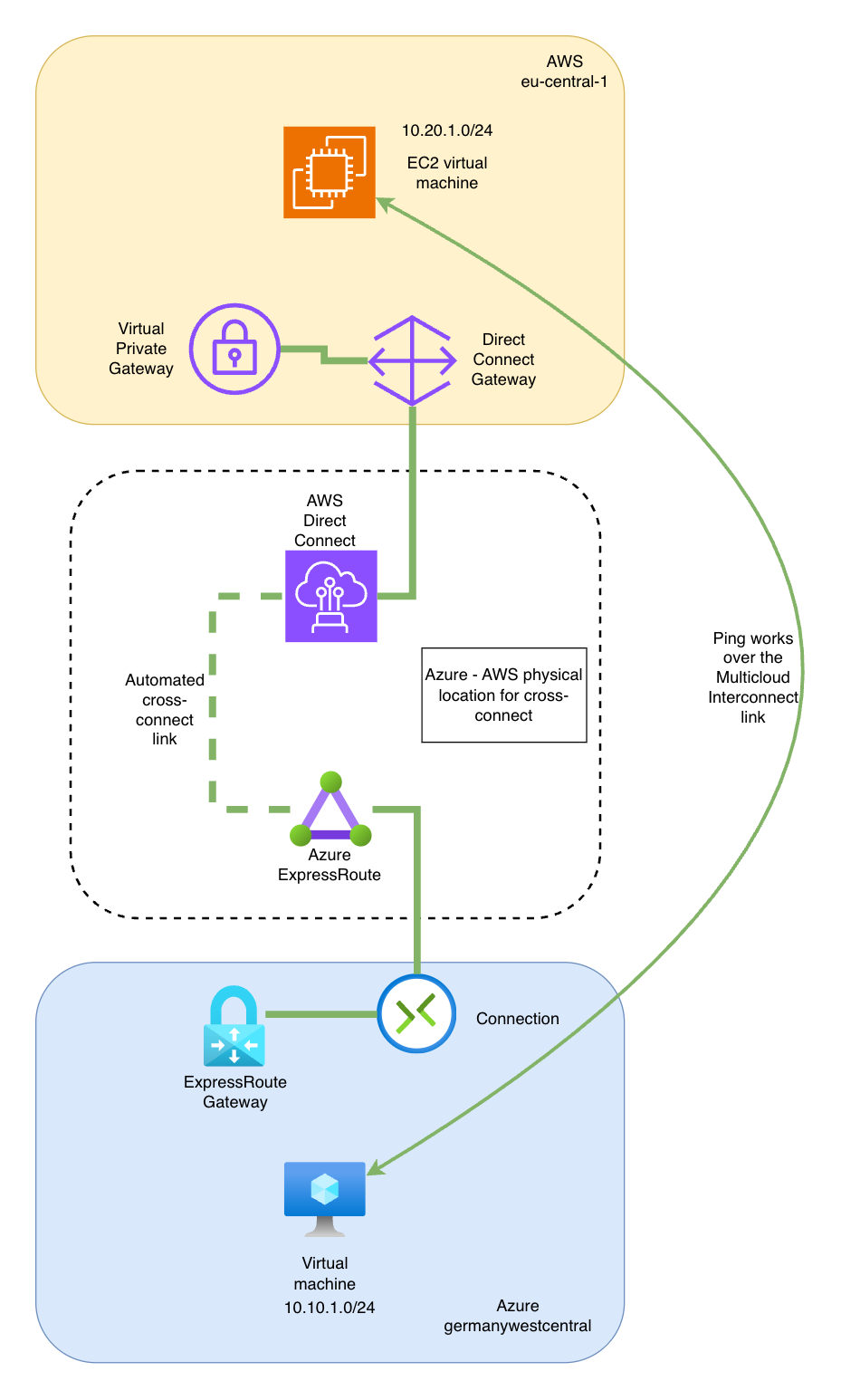
Announcements are great, but as engineers we like to see things working. So I built a lab that deploys the following resources.
On the AWS side:
- VPC with a subnet, route table and a security group that allows SSH access
- EC2 virtual machine with an Ubuntu image
- Virtual Private Gateway (connects the interconnect to the VPC)
- Direct Connect Gateway (associates the interconnect with the Virtual Private Gateway)
- AWS Interconnect - multicloud connection (the link towards Azure)
On the Azure side:
- Resource group that contains everything below
- VNet with a subnet for the VM and a subnet for the ExpressRoute gateway
- Network security group that allows SSH access
- Virtual machine with an Ubuntu image
- ExpressRoute gateway
- ExpressRoute circuit with the Azure Multicloud Interconnect port type (the link towards AWS)
- Connection resource that ties the ExpressRoute gateway and the circuit together
The address spaces don't overlap: 10.10.0.0/16 on Azure and 10.20.0.0/16 on AWS.
You can see everything on the following design drawing:
Does it work?
After deploying the resources, the two virtual machines can ping each other over the Multicloud Interconnect circuit. First from the Azure VM to the AWS VM:
azureuser@awsazure-azure-vm:~$ ping -c 3 10.20.1.40
PING 10.20.1.40 (10.20.1.40) 56(84) bytes of data.
64 bytes from 10.20.1.40: icmp_seq=1 ttl=62 time=2.53 ms
64 bytes from 10.20.1.40: icmp_seq=2 ttl=62 time=2.30 ms
64 bytes from 10.20.1.40: icmp_seq=3 ttl=62 time=2.53 ms
--- 10.20.1.40 ping statistics ---
3 packets transmitted, 3 received, 0% packet loss, time 2003ms
rtt min/avg/max/mdev = 2.299/2.452/2.530/0.108 ms
And from the AWS VM to the Azure VM:
ubuntu@ip-10-20-1-40:~$ ping -c 3 10.10.1.4
PING 10.10.1.4 (10.10.1.4) 56(84) bytes of data.
64 bytes from 10.10.1.4: icmp_seq=1 ttl=62 time=2.40 ms
64 bytes from 10.10.1.4: icmp_seq=2 ttl=62 time=2.57 ms
64 bytes from 10.10.1.4: icmp_seq=3 ttl=62 time=2.58 ms
--- 10.10.1.4 ping statistics ---
3 packets transmitted, 3 received, 0% packet loss, time 2003ms
rtt min/avg/max/mdev = 2.396/2.516/2.581/0.084 ms
A round-trip time of around 2.5 ms between the clouds is excellent. A traceroute shows the path:
azureuser@awsazure-azure-vm:~$ sudo traceroute 10.20.1.40
traceroute to 10.20.1.40 (10.20.1.40), 30 hops max, 60 byte packets
 1  10.10.255.7 (10.10.255.7)  4.414 ms 10.10.255.4 (10.10.255.4)  1.790 ms 10.10.255.6 (10.10.255.6)  4.371 ms
 2  169.254.255.5 (169.254.255.5)  4.353 ms 169.254.255.13 (169.254.255.13)  4.331 ms  4.315 ms
 3  10.20.1.40 (10.20.1.40)  7.236 ms *  7.213 ms
Hop 1 is in the ExpressRoute gateway subnet (10.10.255.0/24), so presumably these are the ExpressRoute gateway instances. Hop 2 is in the link-local 169.254.255.0/24 range, presumably the interconnect's point-to-point addressing, and hop 3 is the AWS VM.
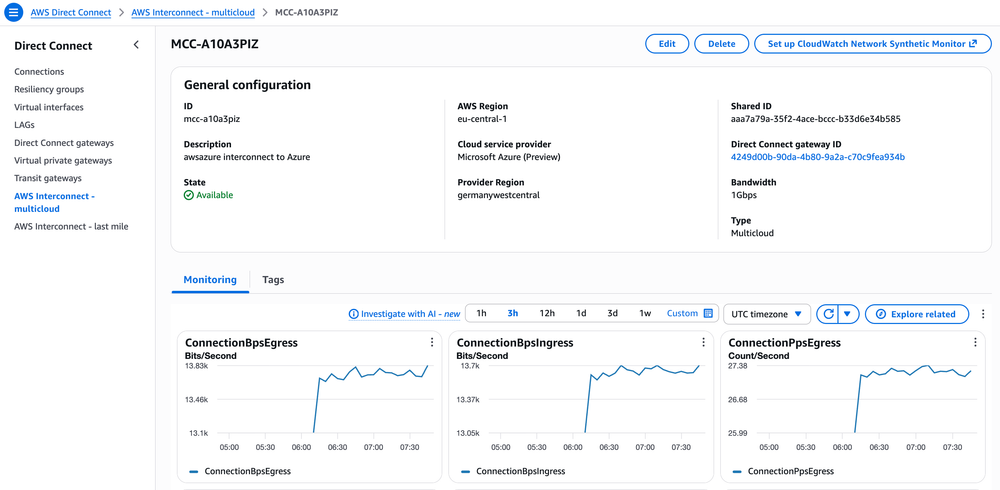
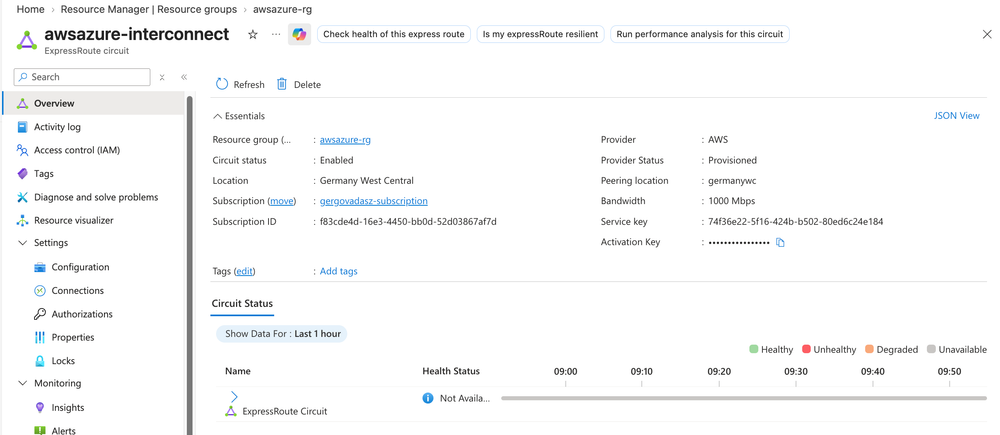
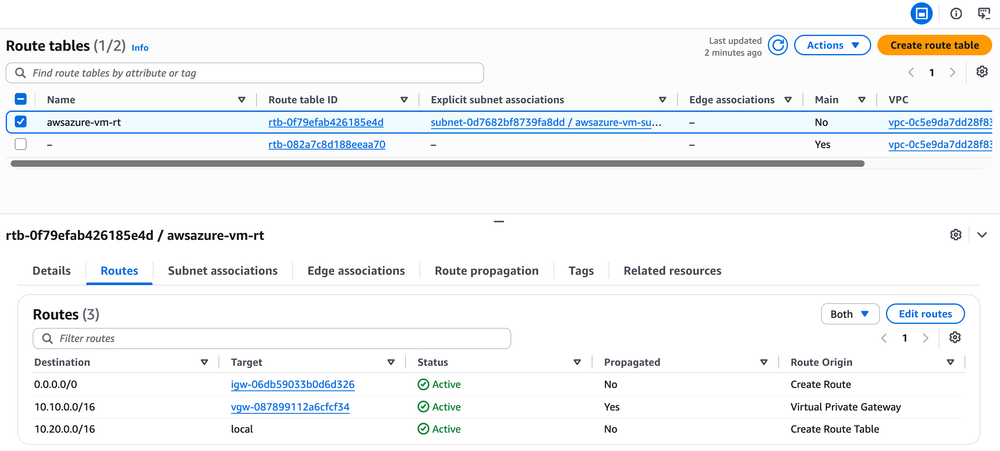
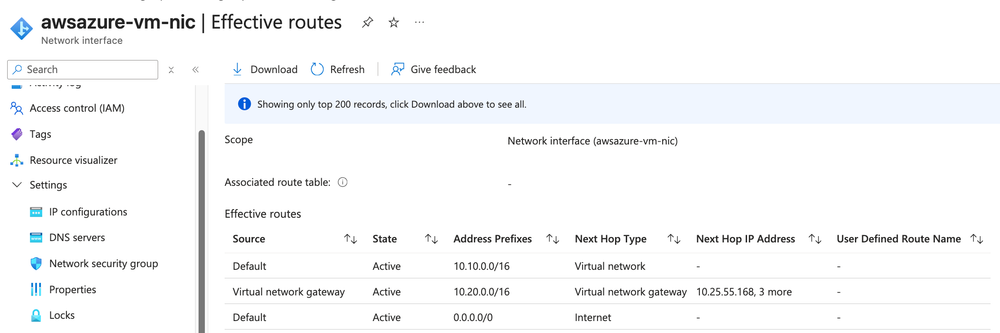
So the setup works as expected, and it can be deployed in a relatively short time. Here are a few more screenshots from the Azure and AWS portals:
Impressions and limitations
The best part is how little there is to do: no cross-connect orders, no VLANs, no BGP sessions to configure by hand, and latency that is hard to beat. The rough edges today are the ExpressRoute gateway deployment time, the Preview limitations (AWS only, 1 Gbps only, local regions only), and the cost on the AWS side, which is charged hourly as long as the interconnect exists. I'm curious to see how pricing looks on the Azure side once the service reaches general availability, because companies deploying this service will be charged on both ends.
Try it yourself: Terraform code
Here you can find the Terraform code that deploys this exact lab: aws-azure-multicloud-interconnect. You may need to run terraform apply (and destroy) twice, because each side has to wait for the other.
Billing is hourly and starts as soon as the interconnect and the ExpressRoute gateway exist, so don't forget to run terraform destroy when you are done.
As usual, I'm happy to answer any comments or questions. If this was useful, subscribe to get new posts straight to your inbox.